Open Source Web HF + 6m SDR
2000 Channels · No GPU
UberSDR is a free, powerful, web-based Software Defined Radio platform for amateur radio enthusiasts, providing real-time access to the entire HF + 6m spectrum and multi-band WSJT-X skimming. Support for third party software via SoapySDR as well as a native desktop client. Based on the affordable RX-888 MKII and generic PC hardware. Powered by ka9q-radio.
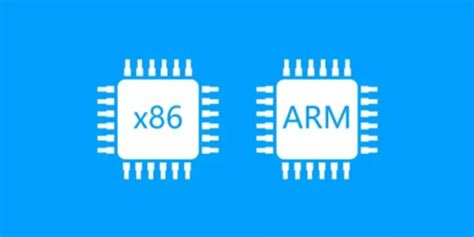
Dual Architecture Support
UberSDR supports both amd64 and arm64
curl -fsSL https://ubersdr.org/install.sh | bash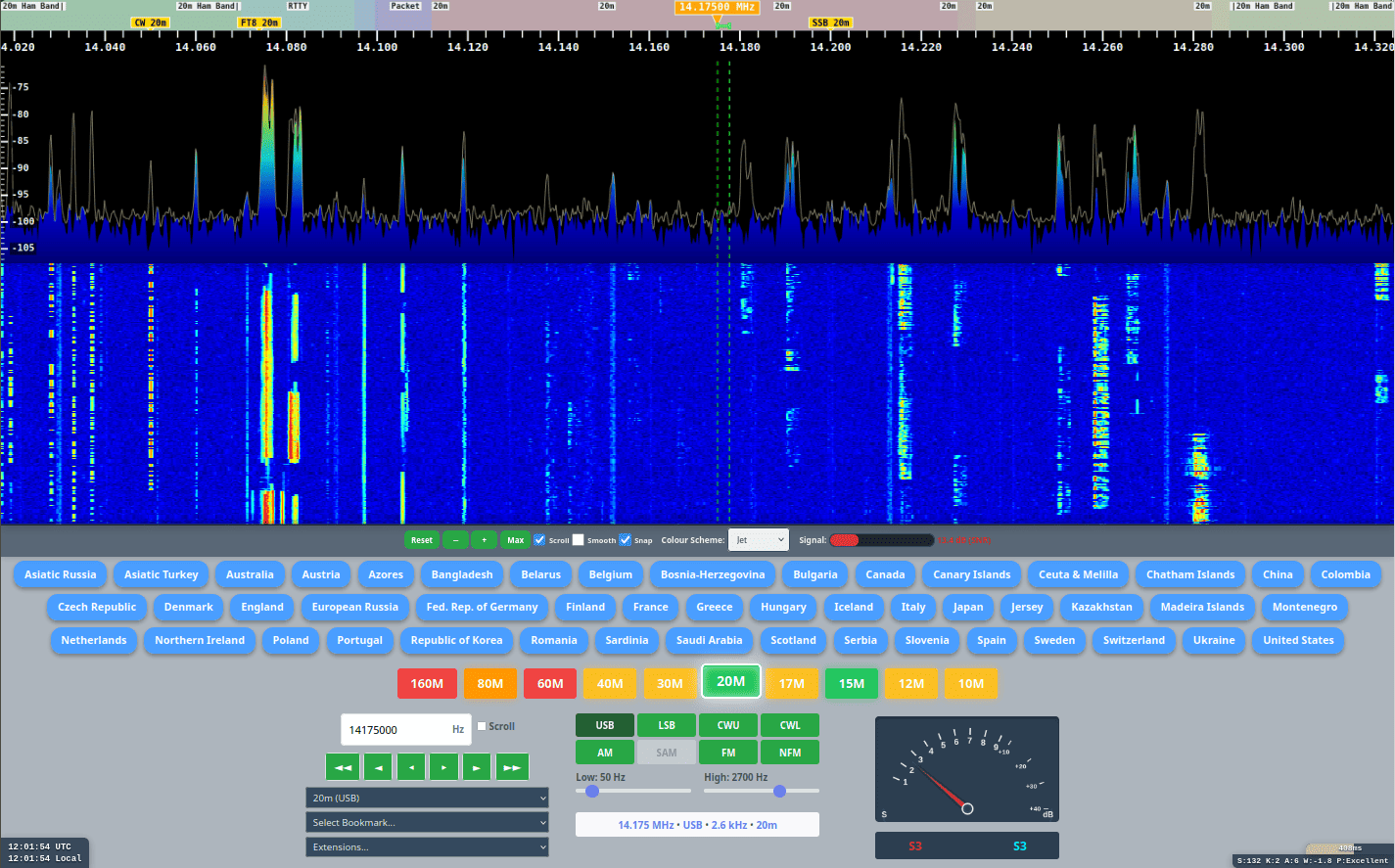


Features
Smart Listen
Multi-Monitor allows listeners to perform real-time diversity receive using multiple UberSDR instances simultaneously. The Smart Listen feature automatically switches audio to the instance with the strongest SNR — so you always hear the clearest signal without any manual intervention.
Listening to a net where a single instance can't hear all stations? Run multiple instances covering different locations and Smart Listen will seamlessly switch to whichever has the best reception for each transmission.
Listen to two instances simultaneously — one routed to the left speaker and one to the right — for a true spatial diversity listening experience across two different locations or antennas.
Who Can Hear Me?
Wondering which UberSDR instances are likely to receive your signal? The Who Can Hear Me? tool uses your location (via GPS or GeoIP) and analyses WSPR propagation data reported by each instance to predict which ones could hear you transmitting SSB Phone at 100–200 W on each HF band.
Instances with Excellent or Good SSB predictions are shown on a world map with their matched Maidenhead grid squares highlighted. Lines connect your location to each coverage area.
If your location marker is incorrect, simply drag it to the right position on the map — results update automatically for the new location.
Mobile Apps
Take UberSDR with you on the go. Mobile apps with native support for UberSDR instances let you tune in from anywhere using your phone or tablet.

UberSDR Official
UberSDR Official is the native iOS and Android app for UberSDR — browse public instances, tune to any frequency, and listen on the move.
* The Google Play link currently downloads an APK directly until the app is live on the store.
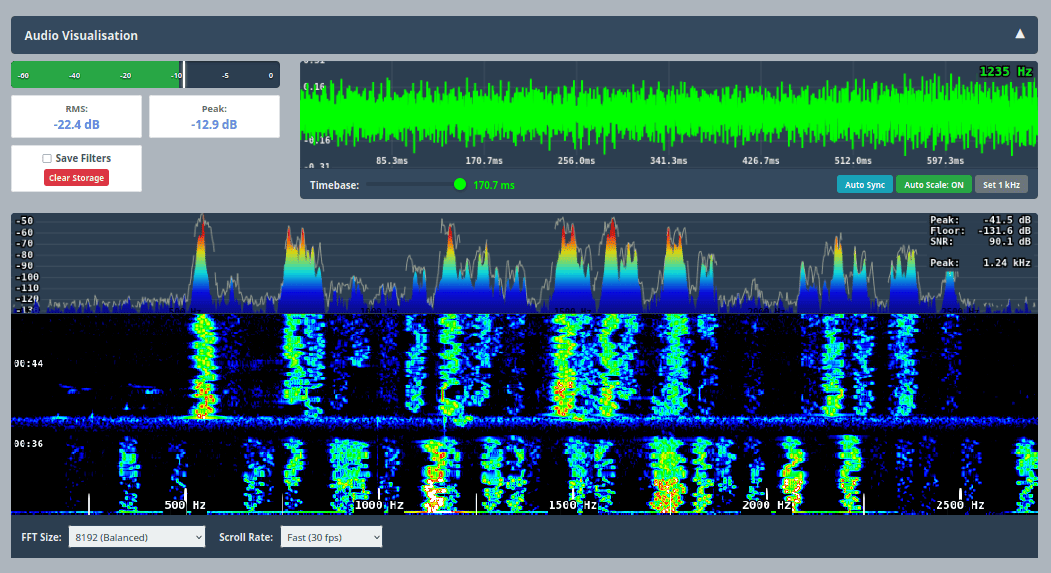
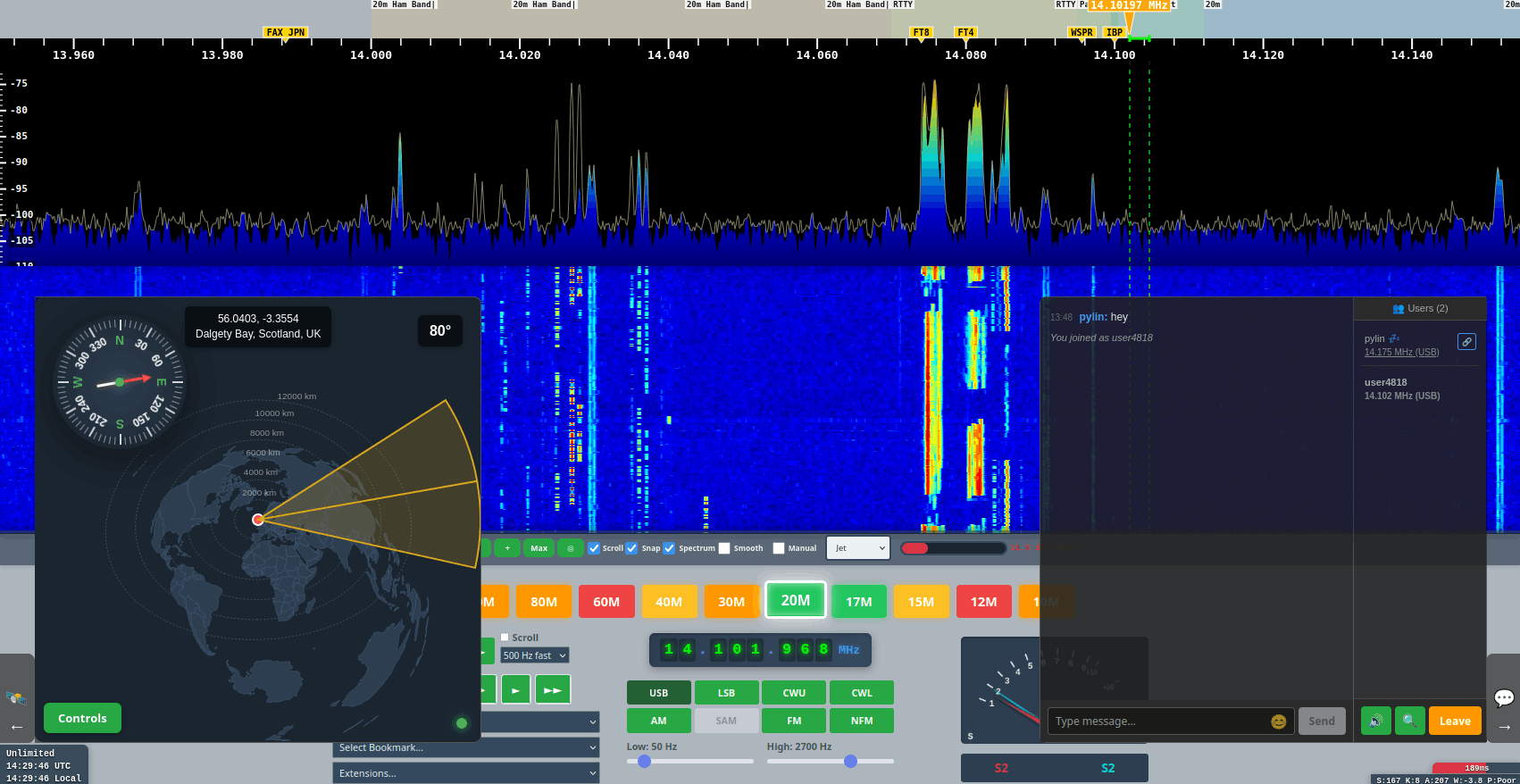
Real-Time Spectrum Analysis
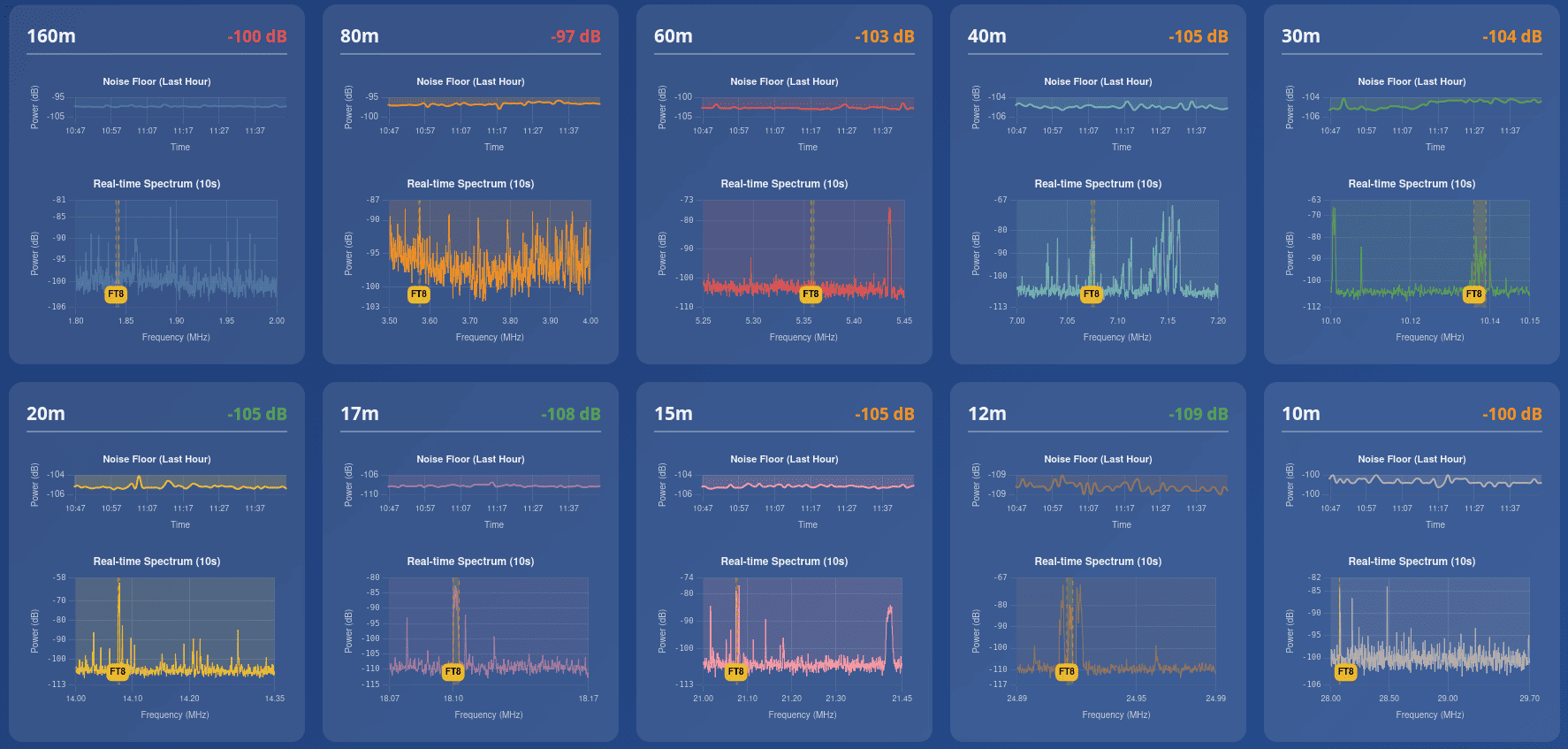
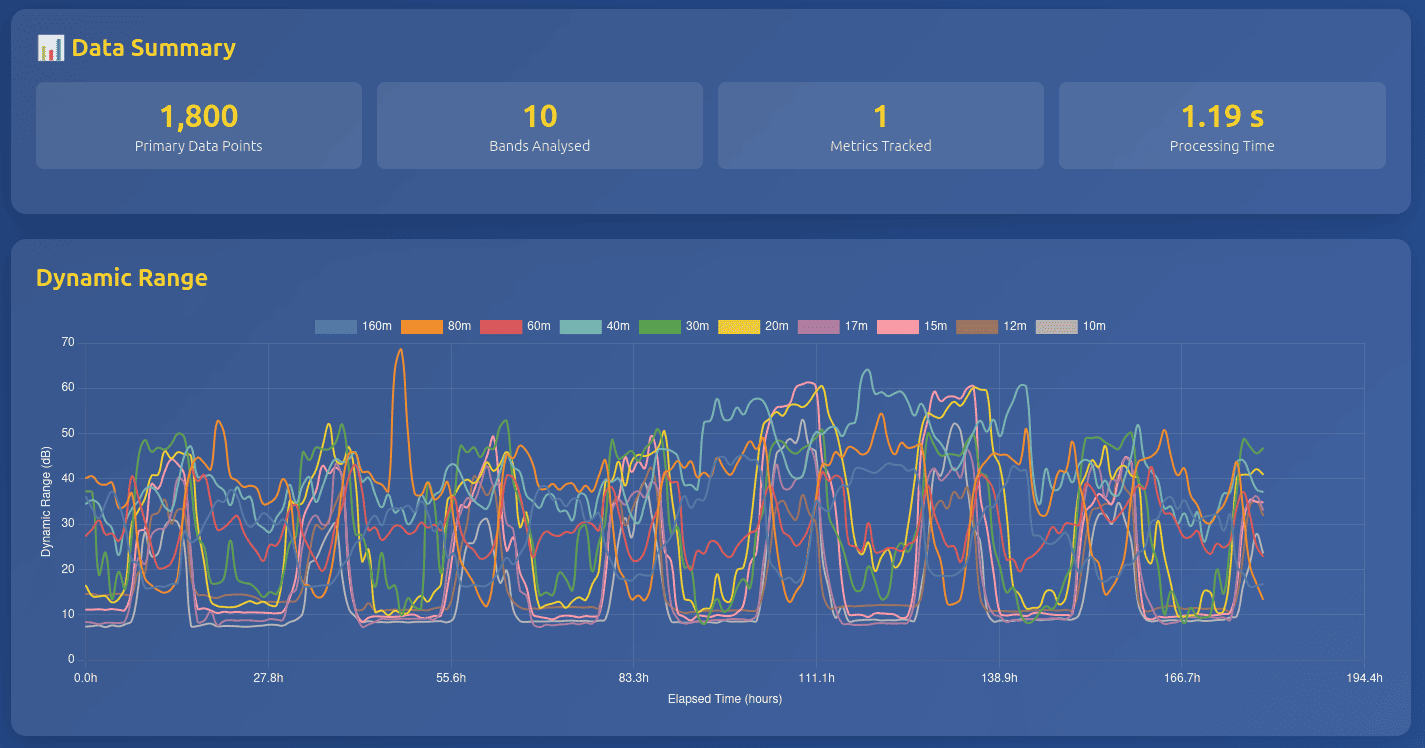
Monitor all HF bands in real-time with background data collection. Historical data is stored enabling analysis of propagation patterns over time.
Many Users
Supports tens or even hundreds of simultaneous users, each independently accessing any HF band at the same time.
Efficient architecture ensures minimal resource usage per user for both demodulated and IQ channels.
Multiple Decoders
Support for all-band skimming of various digital modes including FT2, FT4, FT8, JS8 and WSPR.
PSKReporter and WSPRnet support built in.
Accessibility Options
Keyboard shortcuts for every button ensure full control without a mouse.
Voice announcements for frequency and mode changes keep you informed while operating.
Noise Reduction
Server side DSP provides high quality noise reduction for listeners.
NR2 — MMSE-LSA spectral subtraction
RN2 — RNN-based suppressor, best on speech
NR4 — SPP-MMSE adaptive denoiser
DFNR — Neural network denoiser
Listener Map
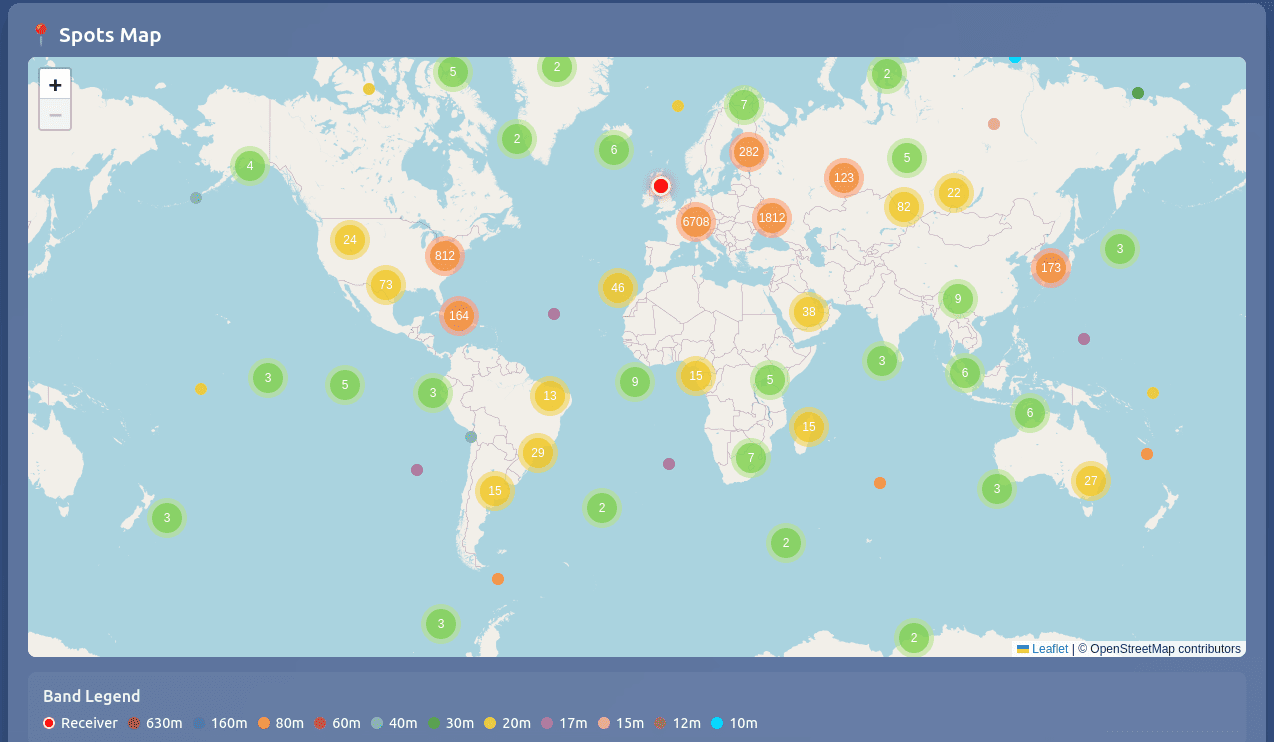
Shows listeners on a world map in real-time. Each listener also appears on a frequency bar.
Easily see popular listener frequencies and discover what others are tuning into.
Band Conditions
Track propagation conditions and band activity with integrated monitoring tools.
SoapySDR Driver
SoapySDR driver with authentication for wide IQ streams. Connect external SDR applications with secure access control.

CW Skimmer
Includes driver and monitoring tool for VE3NEA's Skim Server (8x192 KHz).
Live Chat
Talk to other users in real-time, hear what each other are listening to and synchronise with a user for collaborative listening sessions.
Frequency Reference
Track a known accurate signal and provide offset information over time. Works with WWV or any stable reference signal for precise frequency calibration.
Rotator Control
Supports Hamlib Rotctl integration including automated scheduling and password protected remote control for antenna positioning.
Callsign Lookup
Uses qrz.com to perform real-time callsign lookups. An XML subscription is recommended for enriched data including photos, but is not required.
Antenna Switch
Supports the standard KiwiSDR switch protocol including the MS-S5 WiFi 5 port switch.
Widgets
Widgets are HTML code blocks which add features in the web interface. You can create your own widgets or enable community created widgets.
MQTT Support
MQTT support for real time metrics and decoder data. Perfect for automation and dashboards with Home Assistant and Node-RED.
Prometheus Endpoint
Prometheus endpoint for integration into Grafana to generate useful metric visualisations.
Admin Control Center
Web based Admin control center for configuration, management and access control. Includes configuring background decoders and monitoring system health.
Notifications
Email, Telegram and webhook alerts on system events including health status, users connecting, digital spot rank changes and many more.

Telegram Bot
Real-time requests for current status via Telegram including active sessions, health status, callsign lookups, IP bans and even rotator and antenna switch control.
Galactic Unicorn
Large format LED panel which can receive event alerts and live status information including users, weather, digital spots and band conditions.
Public or Private
Owners can make their instance public or keep it private. Public instances are discoverable by any client application.
Automatic TLS and DNS are available:
- Zero config tunnel (ubersdr.org)
- Port forward (ubersdr.org or own domain)
- Cloudflare (own domain)
API Driven
Frontend is entirely API driven, making creating custom client applications easy.
Spectrum and decoded data is also available via APIs for offline analysis.
KiwiSDR compatible port available for integrating with existing applications.
Modest Hardware
Minimal CPU requirements means even 10 year old i7 mini PCs can support all band all digital mode skimming and 50+ simultaneous web users.
An Intel N150 can support all band WSPR and 50 web users. Raspberry Pi 5 can support 10 WSPR bands and 10 web users.
For multi mode all band digital and CW skimming and 100+ web users, high performance stations with good all band SNR should consider a more powerful CPU, such as a 13th Gen i7 or Ryzen equivalent MiniPC.
Public Instance Directory
Explore public accessible instances of UberSDR. The owner of each instance can choose to make it public and be added to the directory service.
The directory is integrated into all clients to make discovering other instances quick and easy.

Extensions
Extensions allow client applications to decode various common HF signals without the need to pipe audio to external applications.
| CW Spots | Display real-time CW spots from CW Skimmer | ✅ Complete |
| Digital Spots | Display real-time FT8, FT4, FT2, WSPR, and JS8 spots from the multi-decoder | ✅ Complete |
| DRM Decoder | Digital Radio Mondiale decoder for shortwave digital broadcasts — decodes the AAC audio from the IQ stream and plays it back | ✅ Complete |
| DX Cluster | Display DX spots from amateur radio DX clusters in real-time | ✅ Complete |
| FreeDV Decoder | FreeDV digital voice decoder — decodes RADE/FreeDV signals on USB/LSB and plays decoded audio | ✅ Complete |
| FSK/RTTY Decoder | FSK/RTTY decoder supporting ITA2 (Baudot), ASCII, and CCIR476 (SITOR-B) modes — backend-based decoder | ✅ Complete |
| FlexControl | Control the SDR with a FlexControl USB controller using the Web Serial API | ✅ Complete |
| FT8 Decoder | FT8 weak signal digital mode decoder | ✅ Complete |
| MIDI Control | Control the SDR with a USB MIDI controller (DJ controller). Map knobs, faders, buttons and encoders to radio functions | ✅ Complete |
| Morse Code Decoder | Morse code decoder with automatic tone and WPM detection — decodes the CW signal in your receiver's passband, with optional manual pitch lock and click-to-tune audio spectrum | ✅ Complete |
| NAVTEX Decoder | NAVTEX FSK decoder for maritime communications | ✅ Complete |
| Olivia Decoder | Olivia MFSK decoder for weak signal keyboard-to-keyboard chat — selectable tone and bandwidth combinations with automatic frequency search | ✅ Complete |
| QRSS Grabber | Ultra-slow CW (QRSS) spectrogram grabber — captures a narrow HF window and displays a scrolling waterfall for monitoring QRSS beacons | ✅ Complete |
| Radio Sync | Synchronise frequency and mode with external radios via serial port | ✅ Complete |
| Sound Modem | Packet radio decoder supporting BPSK and AFSK modulations with IL2P — decodes up to 4 channels simultaneously | ✅ Complete |
| SSTV Decoder | Slow Scan Television (SSTV) decoder supporting 47 modes including Martin, Scottie, Robot, PD, and MMSSTV | ✅ Complete |
| WEFAX Decoder | Weather Fax (WEFAX) decoder for receiving weather charts and satellite images | ✅ Complete |
| WWV Clock | WWV, WWVH and WWVB time-code decoder — recovers UTC from the standard time stations and shows your clock offset and signal quality | ✅ Complete |
| Speech-to-Text | Real-time speech-to-text transcription | ✅ Complete |
Desktop Client
Access UberSDR from your desktop even if you don't run an instance yourself.
The client acts like a physical radio with audio routing and CAT control allowing direct use with popular applications like WSJT-X and Fldigi. Also supports TCI for combined CAT/audio over the network for software like JTD-X and SDC (Software Defined Connectors).
Download the UberSDR desktop client for your operating system to access instances
with a native application experience.
- Public instance discovery
- Rigctl, Flrig, OmniRig & TCI
- MIDI controller support
- High bandwidth IQ streams
- Full GUI or headless CLI
- Flexible audio routing

Linux
The AppImage runs on any distribution and installs nothing. The .deb installs properly on Debian and Ubuntu — menu entry, icon and ubersdr:// links. ARM64 is a Raspberry Pi 5, an Asahi Mac or an ARM server.
Minimal Audio Client
A lightweight audio client for Linux and Windows, ideal for tuning into specific frequencies and piping audio to any output device. Supports saving profiles which store the instance, frequency, mode and audio options for quick recall.
- Lightweight & fast
- Tune to any frequency
- Pipe audio to any output device
- Save and load profiles
- Profiles store instance, frequency, mode & audio options
- Real time signal, SNR and audio levels
- FLRig Sync — synchronise with a physical transceiver (set Rig to 'none' if no physical radio)
- Sync other applications e.g. FLDigi and WSJT-X via FLRig

Windows
Download Minimal Audio Client for Windows
Linux
Download Minimal Audio Client for x86_64 Linux
Minimal Audio Client Screenshots
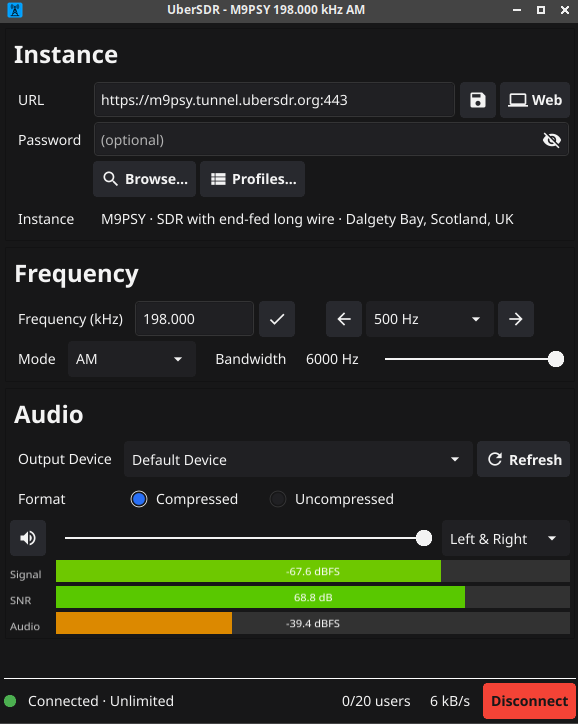
Minimal Audio Client
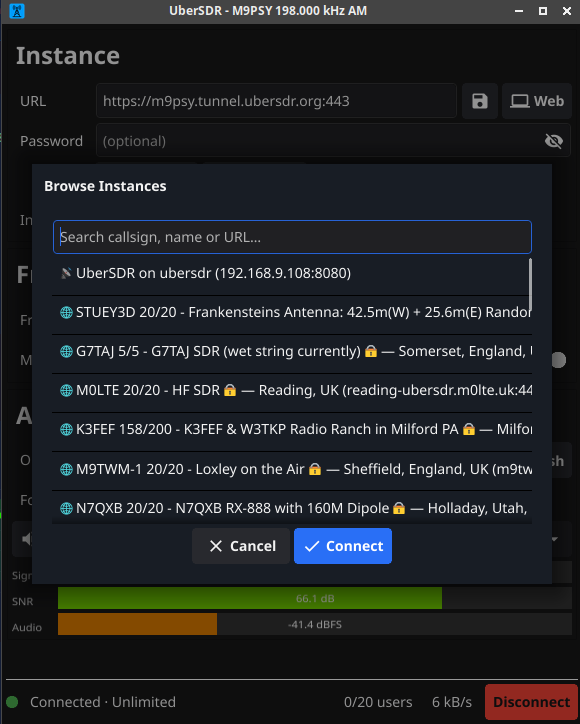
Profile Management
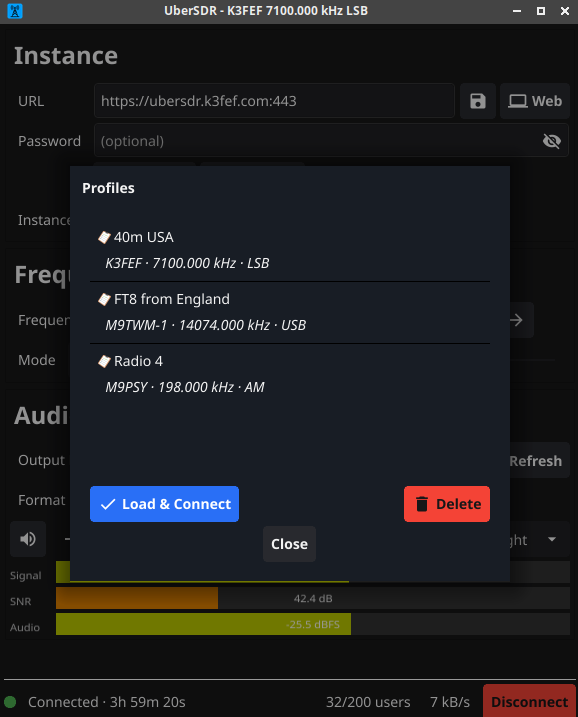
Audio Options
Terminal Client
A spectrum, waterfall and audio receiver that runs entirely in a terminal — including over SSH, on a machine with no desktop at all.
Each download is a single static binary with nothing to install and no libraries to find: pure Go, so the same client runs on a Raspberry Pi Zero and on an Apple Silicon Mac. Run it with no arguments to browse the public directory and pick a receiver, or point it straight at one.
- Spectrum & waterfall drawn in the terminal
- Public instance directory & LAN discovery
- One static binary, no dependencies
- Audio out, or raw PCM / WAV to stdout
- Headless mode for scripts and services
- Runs over SSH on anything from a Pi Zero up
Windows
Windows Terminal recommended — the built-in console draws the waterfall less well.

macOS
Audio through CoreAudio. Signed and notarised by Apple, so it runs without a Gatekeeper warning.
The Linux and macOS downloads are plain executables rather than installers, so mark one runnable before starting it:
chmod +x ubersdr-tui-linux-arm64
Then ./ubersdr-tui-linux-arm64 to browse the receiver directory, or add -server <name-or-host> to connect to one directly. The macOS builds are signed and notarised, so nothing else is needed there either.
Windows Utilities
For Windows users, these free utilities are highly recommended for routing audio and creating virtual serial ports. They enable seamless integration with third-party applications like WSJT-X and Fldigi.
🔌 Virtual Serial Ports
The UberSDR client can emulate a Kenwood TS-480 when required. Create virtual COM ports to connect the client with applications that require CAT control via serial ports.
Free Virtual Serial Ports →🔊 Virtual Audio Cable
Route audio between the UberSDR client and digital mode applications like WSJT-X, Fldigi and others.
Desktop Client Screenshots
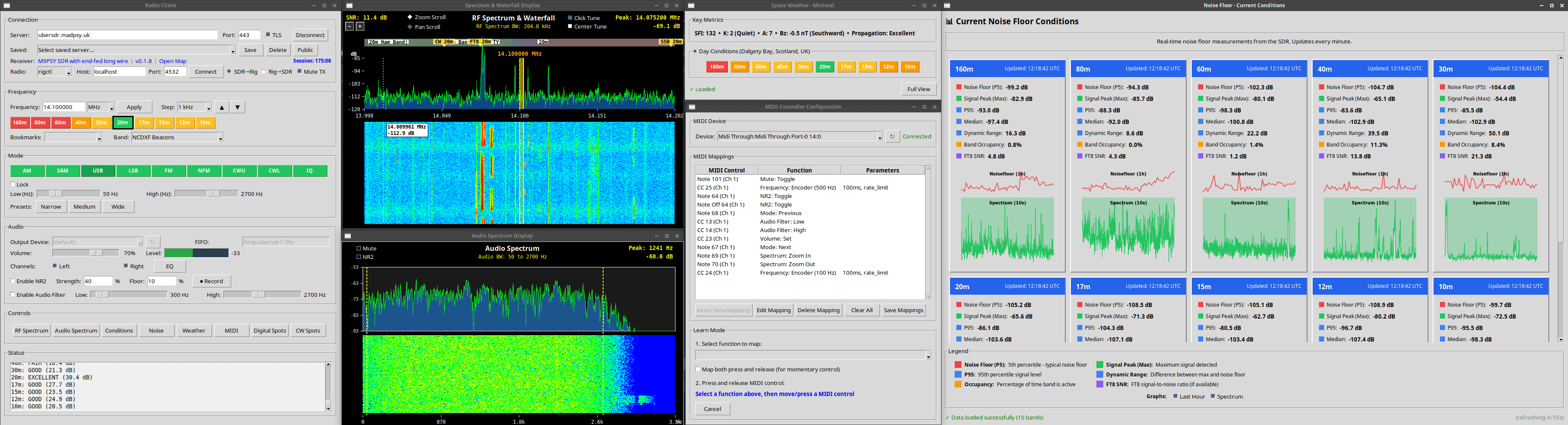
Multiple Windows Support
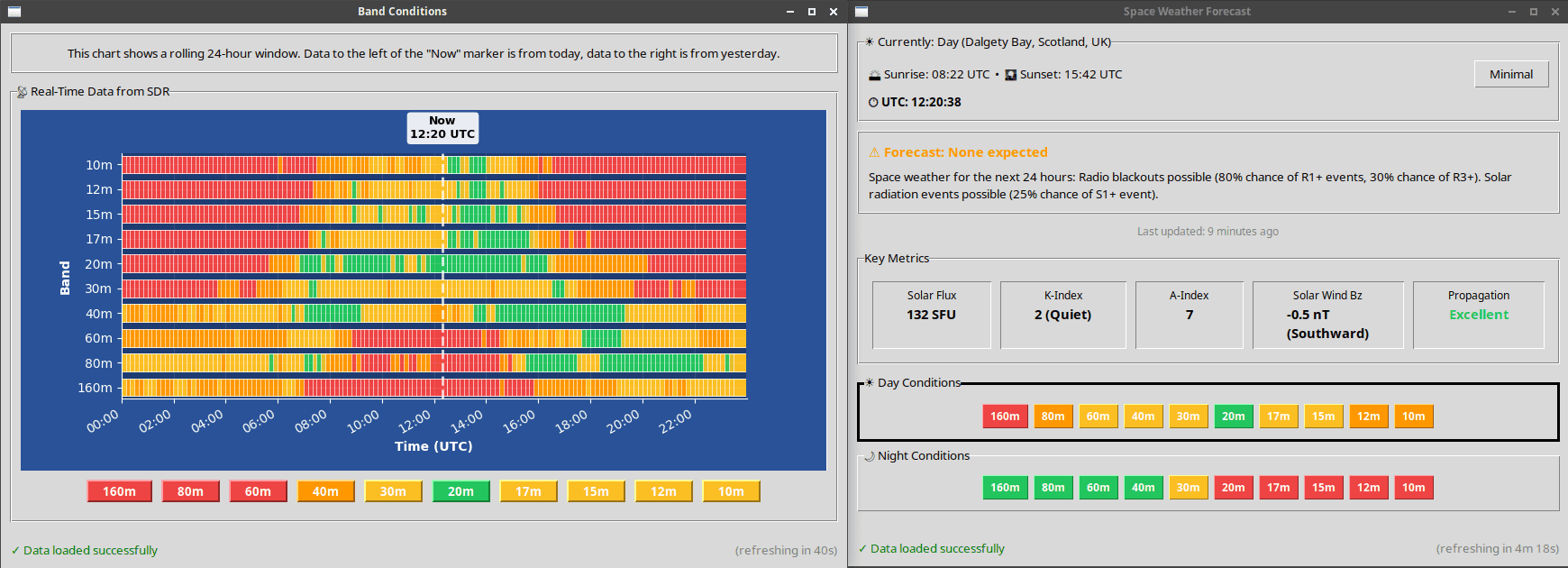
Band Conditions Monitoring

CW Spots Display
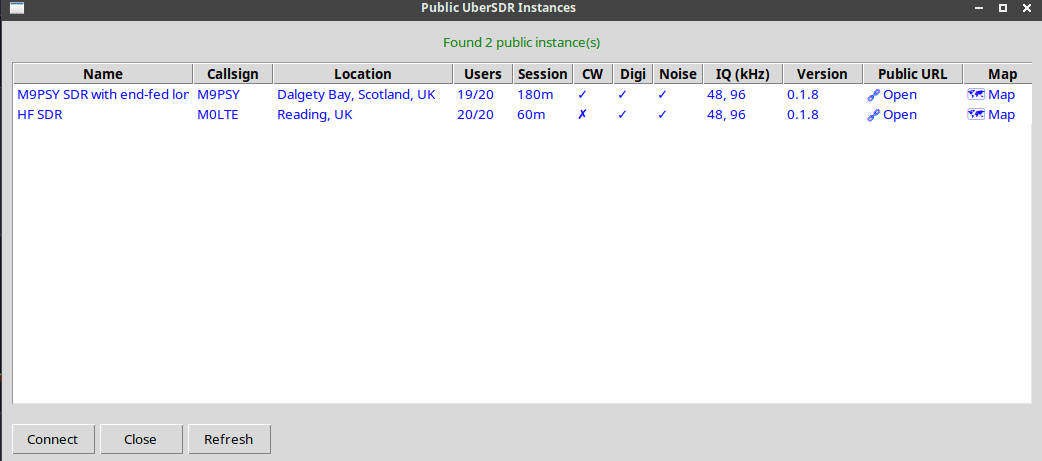
Instance Discovery
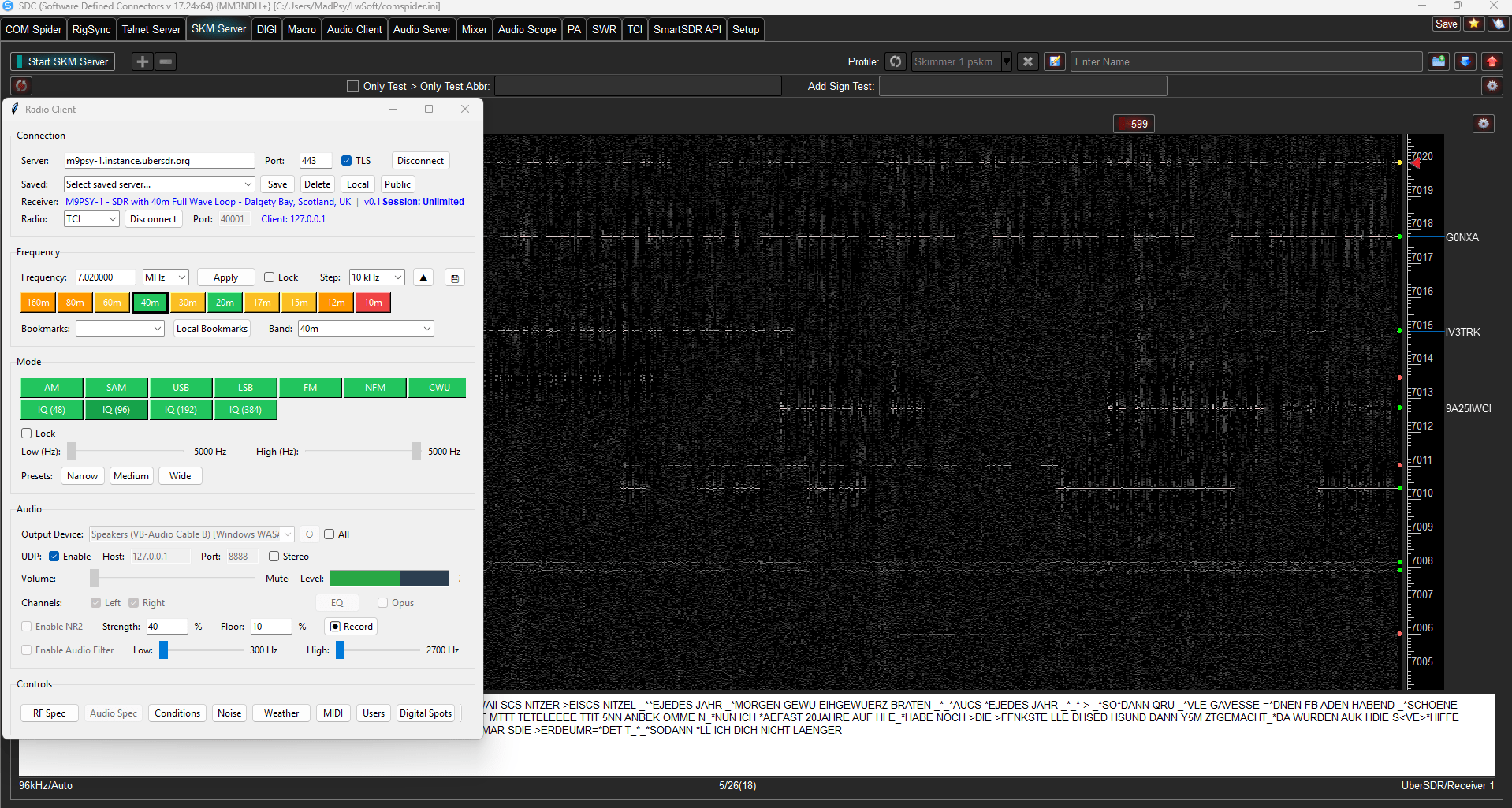
SDC via TCI (www.lw-sdc.com)
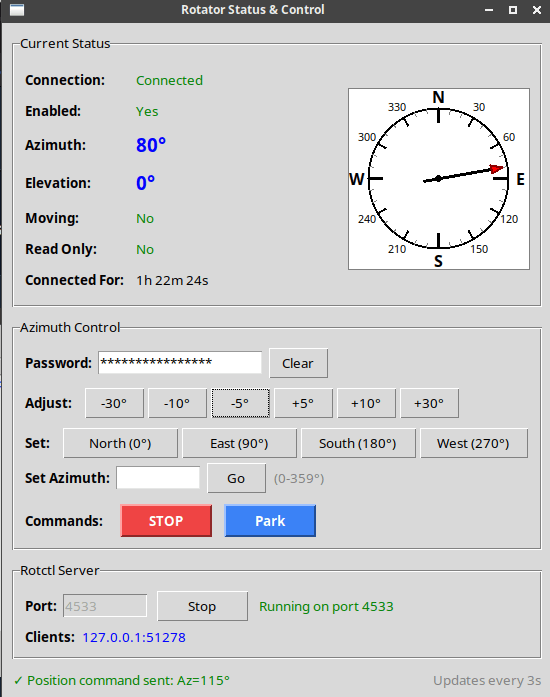
Rotator Control
Browser Extensions
Browser extensions that enhance your UberSDR experience directly from your web browser — no installation on the SDR host required.
UberSDR Bridge
- Open multiple UberSDR instances simultaneously
- Control frequency, mode and bandwidth
- Connects to FLRig for transceiver integration — allowing other applications such as FLDigi & WSJT-X to be synced (set Rig to 'none' if no physical radio)
- Sync VFO A/B with physical transceiver hardware
- Auto mute on TX
- Works with Multi Monitor / Smart Listen
 Add to Firefox
 Add to Chrome
IQ Recorder
Record multiple IQ streams up to 384 KHz each for later analysis and playback. Perfect for capturing contest weekends, rare DX openings, or monitoring multiple bands simultaneously.
- Record multiple IQ streams simultaneously
- Up to 384 KHz bandwidth per stream
- Built-in spectrum monitoring output
- SSB and CW demodulation
- Configurable automatic scheduler
- Perfect for contest weekend recording
Example use case: Schedule recordings across 20m, 40m, and 80m during a major contest weekend. The automatic scheduler can start and stop recordings based on time and day, capturing all the action for playback afterwards with software such as SDR++.
IQ Recorder Screenshots
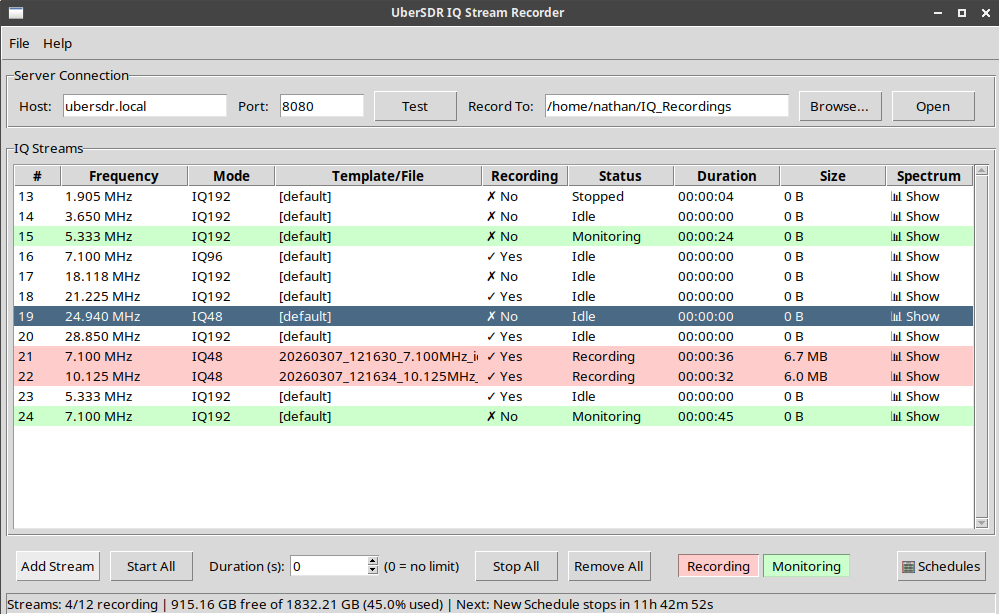
IQ Recorder Main Interface
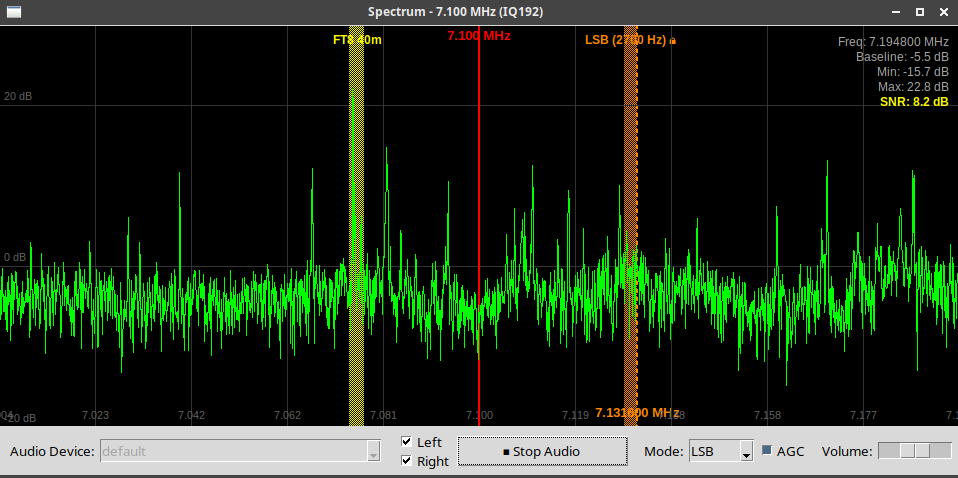
Spectrum Monitoring with Demodulation
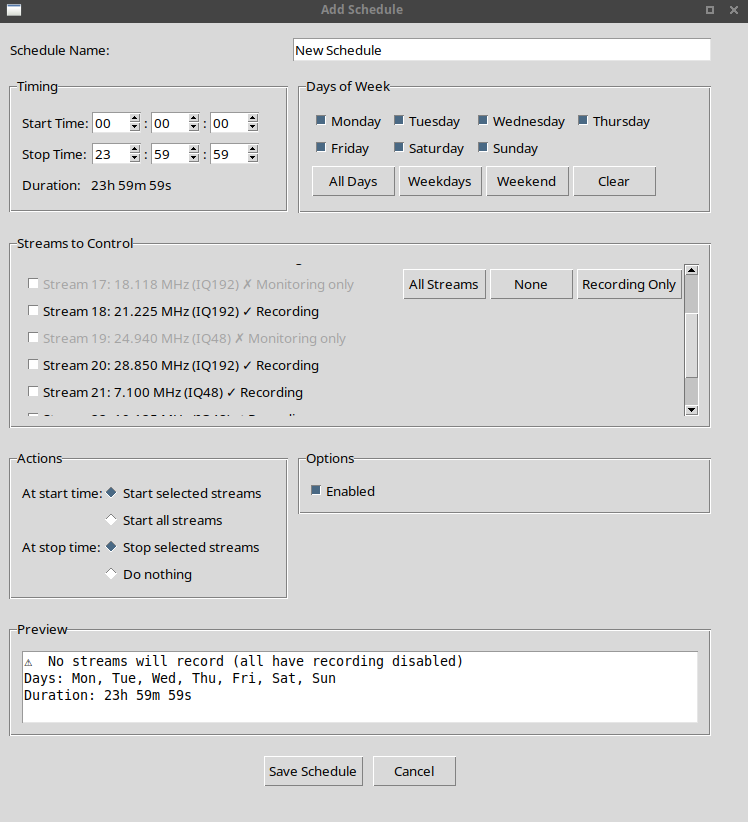
Automatic Recording Scheduler
Drivers
Drivers for third party applications so they can talk to UberSDR instances.
CW Skimmer
Driver for SkimServ. Connect to your local instance for CW skimming.
VE3NEA's Skim Server DLL, also works with CWSL.
SoapySDR
Driver for SoapySDR. Supports both local and public instances.
Works with SDR++, Gqrx, GNU Radio and many others.
HPSDR
Bridge application that makes UberSDR appear as an openHPSDR radio. Allows applications like SparkSDR and Thetis to connect using Hermes-Lite compatible protocol with 10 available slices up to 384 KHz each.
Also compatible with deskHPSDR, linHPSDR, SDR Console and AetherSDR.
Host bridge — automatically installed by the installation script. Manual downloads: amd64 · arm64
Terminal client — run the bridge on your own computer instead, connecting to any local or public UberSDR instance. Includes a setup screen with receiver browsing (public directory and LAN) and a live status view. Downloads: Windows (x64) · macOS (Apple Silicon) · Linux amd64 · Linux arm64

KiwiSDR
UberSDR has KiwiSDR emulation and frontend built in on port 8073.
Any KiwiSDR compatible client can connect and it will behave like the real hardware, including the KiwiSDR web interface itself and kiwirecorder.
Supports the usual Kiwi audio modes plus IQ, the 0–30 MHz waterfall with all 15 zoom levels, compressed audio, S-meter, AGC and squelch.
Public access: forward port 8073 and turn on registration, and your receiver is listed on rx.kiwisdr.com alongside real KiwiSDRs. Kiwi listeners use the same session slots, passwords and bans as UberSDR's own listeners.
Host: ubersdr.local Port: 8073

SDR++
Native source module for SDR++ and SDR++ Community Edition. Pick a receiver from the public directory, find one on your LAN, or enter its address, then stream up to 384 KHz of IQ.
Downloads: Windows (x64) · macOS · Linux x86_64 · Linux ARM64
Install: unzip, then copy the module file into SDR++'s modules folder (the included INSTALL.txt gives the location for your system). Restart SDR++, open Module Manager, choose ubersdr_source, give it a name and press +. Then select UberSDR as the Source, pick a receiver and press Play.
RTL-TCP
UberSDR has RTL-TCP emulation on port 1234.
Connect any compatible RTL-SDR client with network support to your local UberSDR instance. This includes SDR Console.
Host: ubersdr.local Port: 1234
Note: UberSDR always supplies 384 KHz of IQ. Set the sample rate to 384 KHz in your client for the full bandwidth; other rates are resampled.
Third-Party Application Screenshots

CW Skimmer Monitor (Afreet SkimServ)

SDR++ via SoapySDR
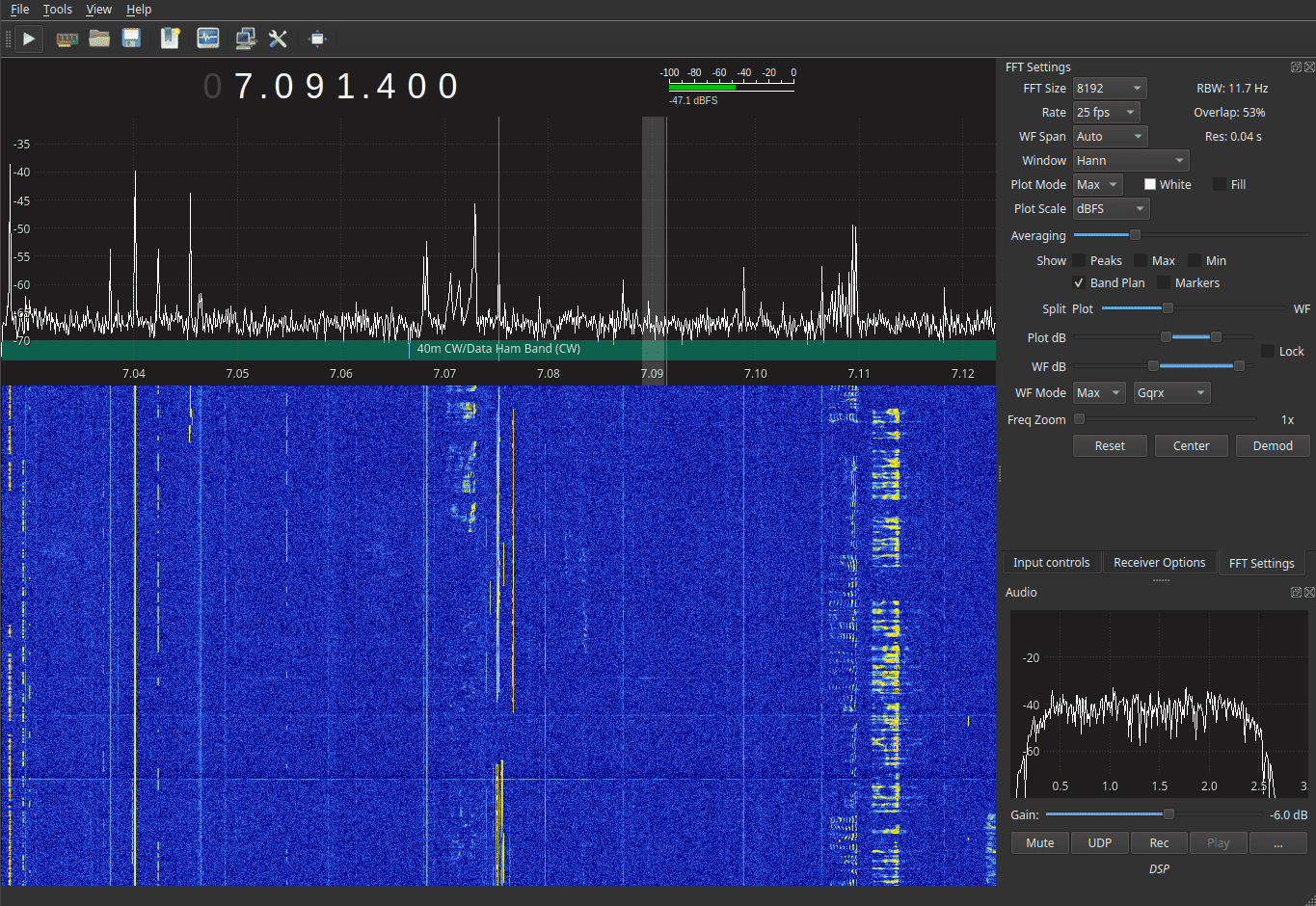
Gqrx via SoapySDR
SDC via TCI connection
Addons
Optional add-ons that extend UberSDR with additional decoding capabilities. Each addon runs as a background service on your UberSDR machine, continuously decoding 24/7 without any user interaction required. Each requires UberSDR to be installed first.
HFDL — HF Aircraft Tracking
Decode HFDL transmissions and track aircraft in real time on HF frequencies. Plots aircraft on a map along with statistics and network information.
Monitor All Frequencies Simultaneously
During the training phase, UberSDR monitors all HFDL frequencies at once to learn which ground stations and frequencies are active in your region. No manual tuning required.
Optimisation Tips After Training
Once training is complete, the system analyses activity patterns and provides tailored recommendations to reduce CPU usage — focusing only on the frequencies that matter for your location.
Ground Station Frequencies
View the frequencies used by each HFDL ground station. Identify the most active stations and frequencies for your antenna and location.
Performance Metrics
Detailed decode statistics including message counts, error rates, and per-frequency performance — giving you full visibility into how well your setup is performing.
Live Aircraft Map
A real-time map shows all currently active aircraft decoded from HFDL transmissions, including flight identifiers, positions, and ground station associations.
One-Command Installation
Install the UberSDR HFDL application with a single command on the same machine as your UberSDR instance. It integrates directly with your existing setup.
environment: section of ~/ubersdr/hfdl/docker-compose.yml to forward decoded messages to any BaseStation-compatible feeder (e.g. Planefinder, ADS-B Exchange):
EXTRA_ARGS: "--output decoded:basestation:tcp:address=my-favourite-feeder.com,port=32010"HFDL Screenshots
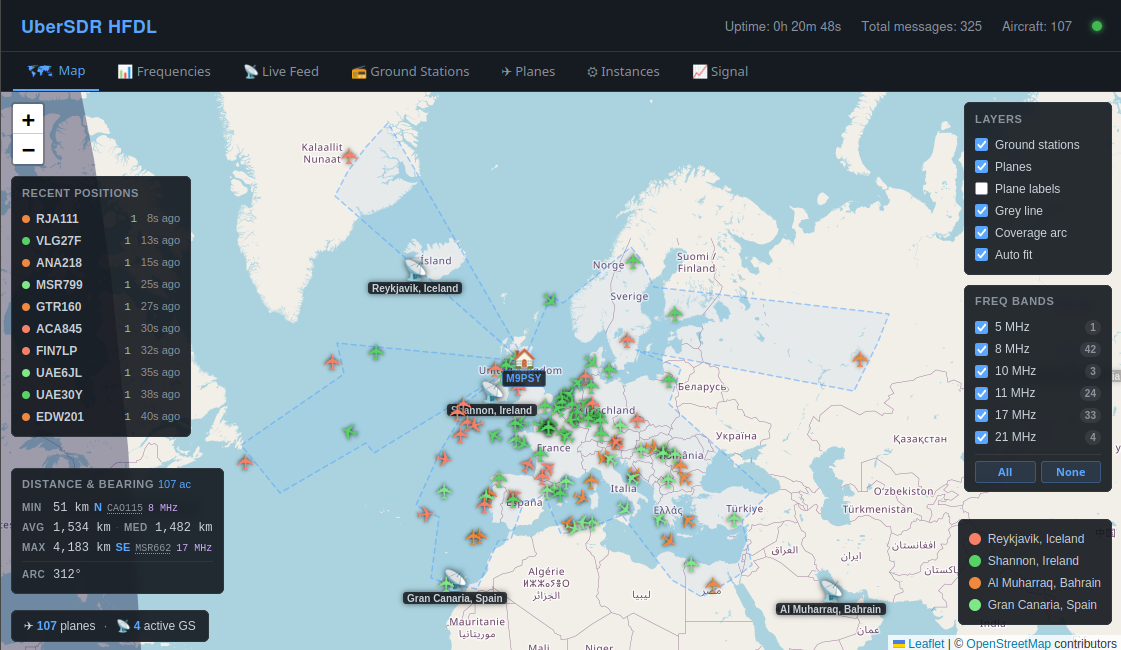
Live Aircraft Map
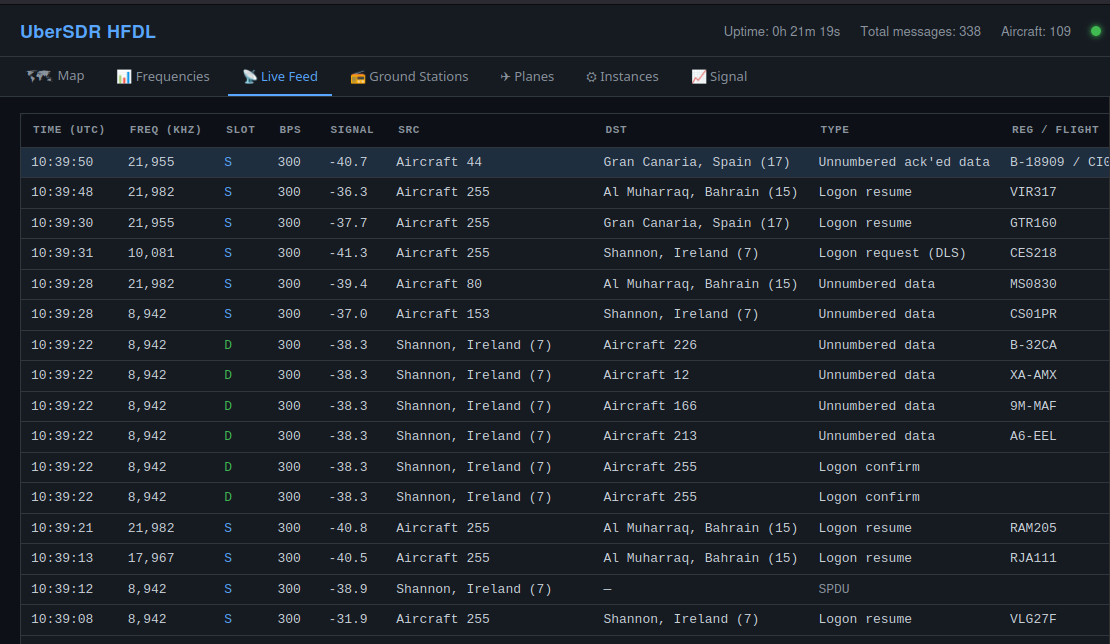
Live HFDL Decodes
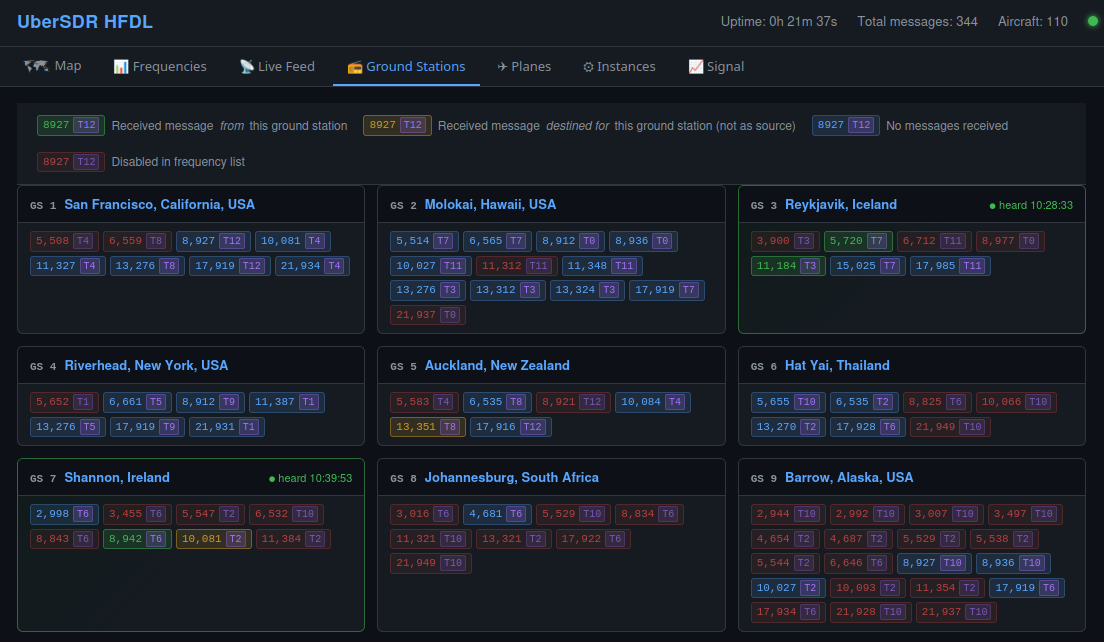
Ground Station Frequencies
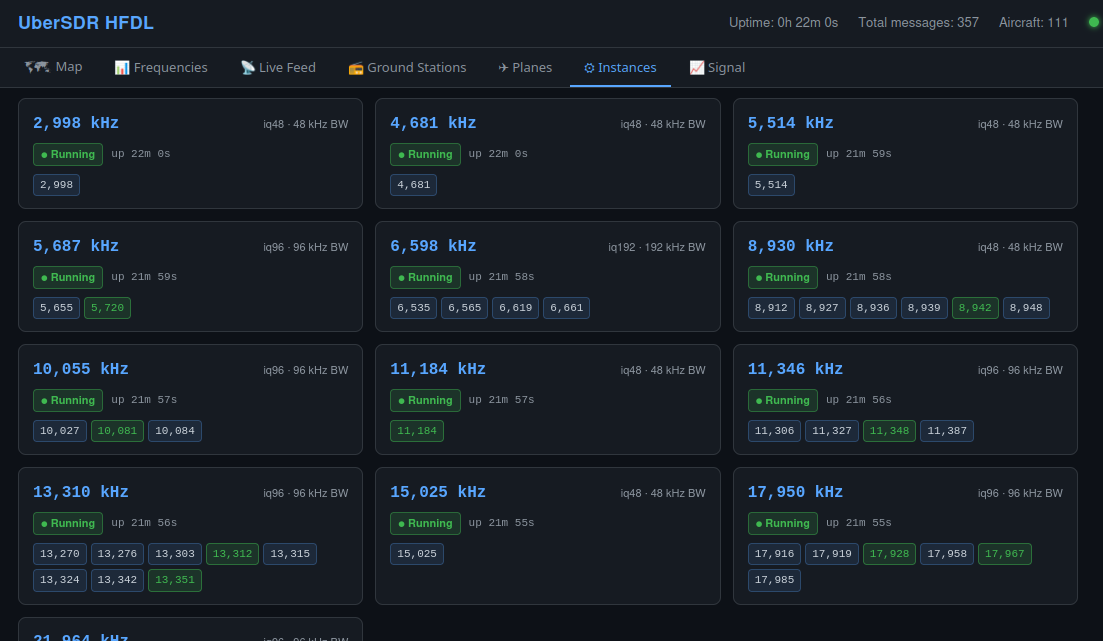
Frequency Activity Monitor
SSTV — Slow Scan Television Receiver
Decode SSTV transmissions in the background and browse a gallery of received images — complete with SNR data, callsign mapping, and real-time waterfall monitoring.
Image Gallery
All received SSTV images are stored and presented in a browsable gallery. View decoded images from amateur radio operators around the world, accessible entirely from your web browser.
Signal-to-Noise Ratio
Each received image is tagged with its SNR at the time of decode, giving you a clear picture of reception quality and helping you identify the best frequencies and times for SSTV.
Callsign Map
Callsigns decoded from received images are plotted on a world map, showing you where transmitting stations are located and giving a visual overview of your reception coverage.
Real-Time Audio & Waterfall
Monitor the audio and waterfall display in real time directly in your browser. Watch SSTV signals appear and decode live without any additional software.
Automatic Cleanup
Poor quality or incomplete decodes are automatically detected and removed. Configurable retention settings let you control how long images are kept before being cleaned up.
Decode Statistics
Detailed statistics on decode counts, success rates, and activity over time — giving you full visibility into how your SSTV station is performing.
SSTV Screenshots
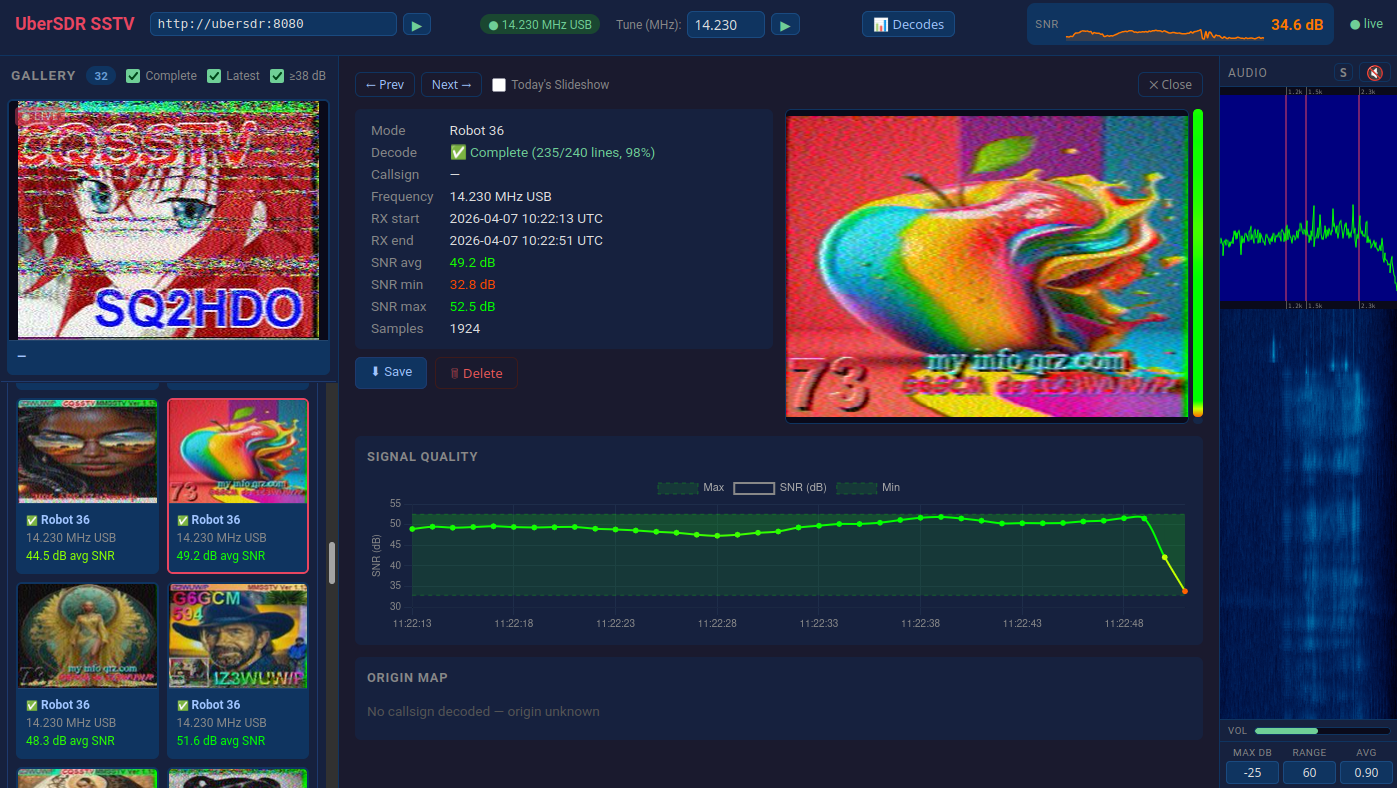
SSTV Image Gallery
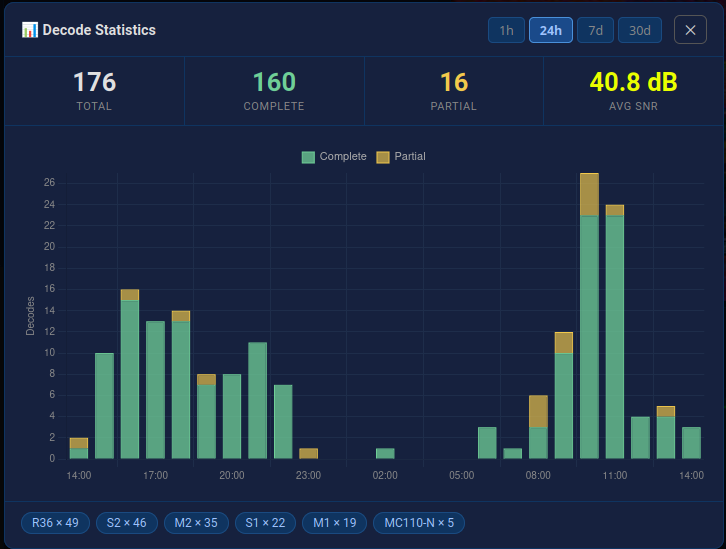
Decode Statistics
CW Skimmer — All-Band CW Decoding (not supported on ARM)
Full all-band CW skimming using Afreet SkimServ in a Linux Desktop environment, with RBN aggregation and automatic PSK Reporter integration. Note: This add-on is demanding on CPU.
All-Band CW Skimming
SkimSrv runs inside a Linux Desktop environment, providing simultaneous all-band CW skimming across the entire HF spectrum without any manual tuning.
VNC Desktop Access
Access the full Linux Desktop environment via VNC directly from your browser. Monitor SkimSrv in real time and adjust settings without needing a separate machine.
RBN Aggregator
The Reverse Beacon Network aggregator comes pre-installed and pre-configured, so your spots are automatically submitted to the RBN with no additional setup required.
PSK Reporter Integration
PSK Reporter is automatically enabled via UberSDR, reporting your decoded spots to the global PSK Reporter network without any manual configuration.
WEFAX — Weather Fax Receiver
Decode Weather Fax (WEFAX) broadcasts in the background, monitoring multiple HF frequencies simultaneously and saving received images with full signal metadata.
Multi-Frequency Monitoring
Monitors multiple WEFAX frequencies simultaneously, ensuring no broadcast is missed regardless of which frequency is active at any given time. No manual retuning required.
Image Gallery
All received WEFAX images are stored and presented in a browsable gallery. View weather charts, sea state maps, and satellite imagery received directly from meteorological services.
Signal Metadata
Each saved image is tagged with full signal metadata including SNR, frequency, timestamp, and reception quality — giving you a complete record of every decode.
Automatic Cleanup
Configurable retention settings automatically remove old images, keeping storage usage under control while preserving recent weather data for review.
AIRSPLICE — Multi-Stream Audio Recorder
Record multiple simultaneous audio streams continuously, triggered by SNR (VOX), or on a schedule — with per-stream disk space retention and MP3 conversion.
Multiple Simultaneous Streams
Record any number of audio streams at the same time, each independently configured with its own frequency, mode, and recording settings — all running in parallel without interference.
VOX / SNR Triggered Recording
Automatically start and stop recording based on signal-to-noise ratio. Only capture audio when a signal is present, keeping recordings clean and storage usage minimal.
Scheduled Recording
Define time-based schedules for each stream — ideal for capturing regular broadcasts, nets, or propagation windows automatically without any manual intervention.
Continuous Recording Mode
Run streams in always-on continuous recording mode for uninterrupted capture of a frequency — perfect for monitoring nets, beacons, or any ongoing activity around the clock.
MP3 Conversion
Automatically convert recorded audio to MP3 format for compact storage and easy playback. Configurable bitrate settings let you balance audio quality against file size per stream.
Per-Stream Disk Space Retention
Set individual disk space limits for each stream. Old recordings are automatically pruned when the limit is reached, ensuring storage never fills up unexpectedly.
DOPPLER — Doppler Shift Measurement
Perform precise Doppler shift measurements using WWV reference signals across multiple HF frequencies simultaneously, with CSV download and FTP upload support.
WWV Reference Measurements
Uses WWV time and frequency standard broadcasts as a stable reference to measure Doppler shift caused by ionospheric propagation — providing a reliable indicator of ionospheric conditions and solar activity.
Multiple Simultaneous Frequencies
Monitor Doppler shift on multiple WWV frequencies at the same time — 2.5, 5, 10, 15, and 20 MHz — giving a comprehensive picture of propagation conditions across the HF spectrum simultaneously.
CSV Download
Export measurement data as CSV files for offline analysis, archiving, or integration with external tools and research workflows. Each record includes timestamp, frequency, and measured Doppler shift values.
FTP Upload
Automatically upload measurement data to a remote FTP server for centralised logging, sharing with research networks, or long-term archiving without any manual file transfer.
Lightning — VLF Lightning Detector
Detect and log lightning strikes in real time by monitoring the Very Low Frequency (VLF) spectrum, with waveform capture, strike history, and a live spectrum view.
Waveform Gallery
Every detected lightning event is captured as a waveform and stored in a browsable gallery. Review the characteristic electromagnetic pulse shape of each strike directly in your browser.
Detection History
A full history of all detected events is maintained, allowing you to browse past activity, identify storm patterns, and correlate detections with weather data over time.
Strike Log
A timestamped strike log records every detection event with signal amplitude and frequency data, giving you a precise record of electrical storm activity at your location.
Live Spectrum View
Monitor the VLF spectrum in real time directly in your browser. Watch lightning sferic signals appear as broadband bursts across the spectrum as storms develop and move.
Lightning Screenshots
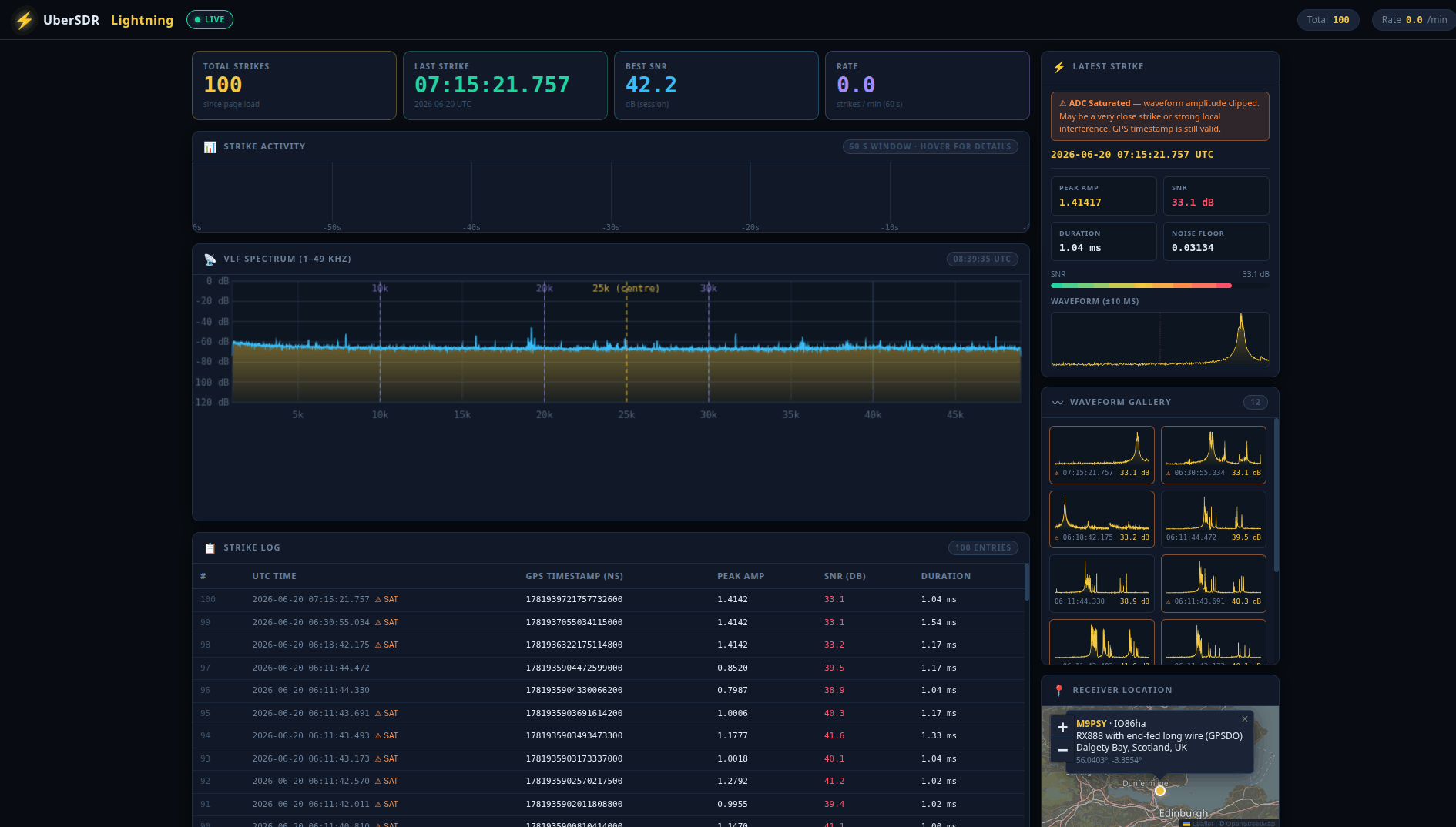
Lightning Detector — VLF Waveform & Strike Log
Packet — AX.25 Packet Decoder
Decode AX.25 packet radio transmissions in the background using multiple simultaneous modems, each with up to 4 channels — with live waterfall, SNR statistics, and per-sender packet tracking.
Multiple Modems, Multiple Channels
Run multiple modem instances simultaneously, each decoding up to 4 independent channels at once — allowing broad coverage across frequencies and modulation types without any manual switching.
AX.25 Packet Decoding
Full AX.25 frame decoding including source and destination callsigns, digipeater paths, and payload data. Decoded packets are displayed in real time and stored for later review.
Live Waterfall
Monitor the audio spectrum in real time with a live waterfall display. Instantly see packet bursts and signal activity across the monitored frequency range directly in your browser.
SNR Measurements & Statistics
Real-time signal-to-noise ratio measurements for each channel, with aggregate statistics giving you a clear picture of reception quality and helping you optimise frequency and modem settings.
Per-Sender Packet Statistics
Track packet counts, decode rates, and activity history broken down by individual sender callsign — making it easy to identify the most active stations and monitor specific nodes over time.
Packet Screenshots
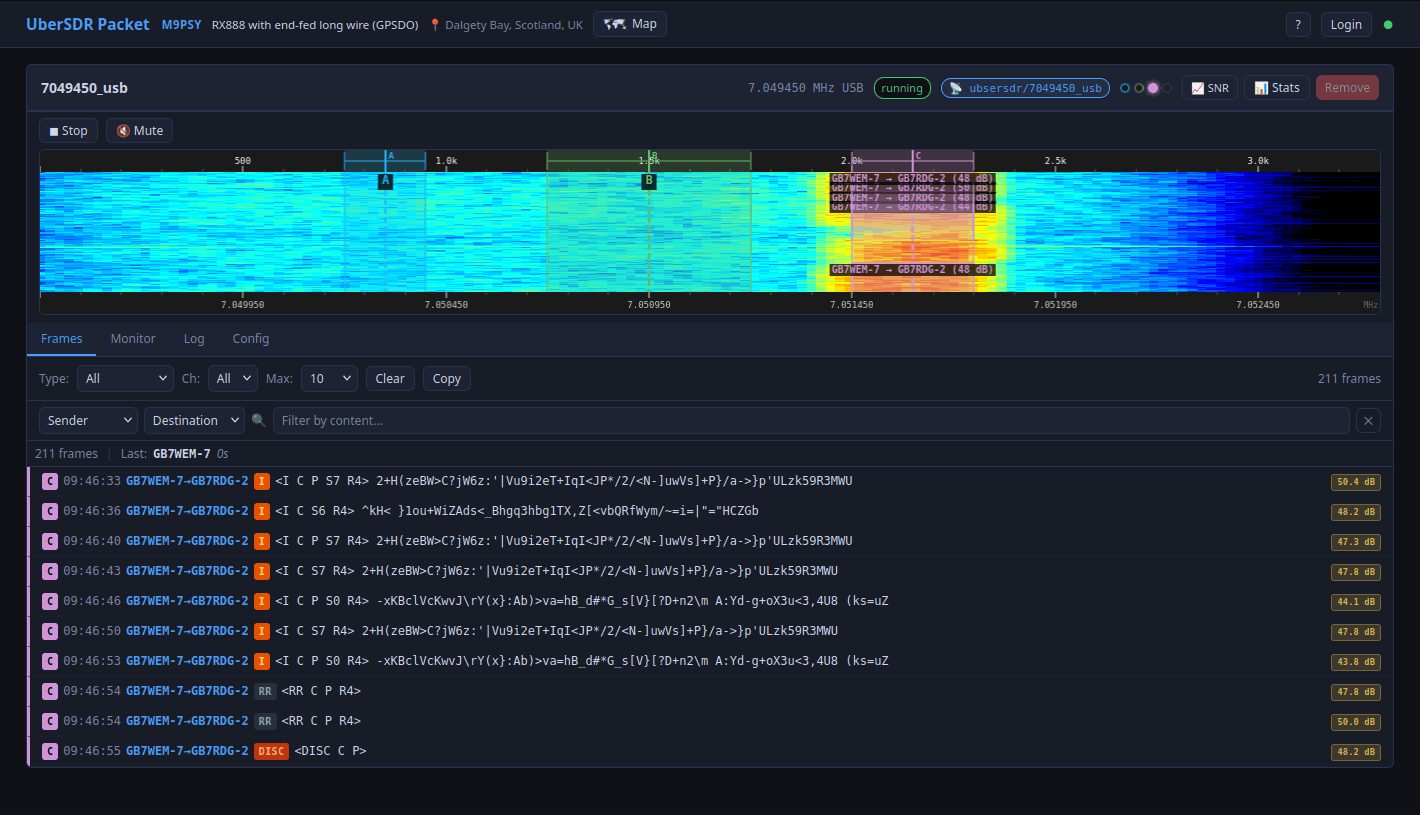
AX.25 Packet Decoder — Live Decodes & Statistics
DX Cluster — Amateur Radio DX Spot Server
A full-featured DX Cluster server combining Digital, CW, Voice and DX spots from multiple sources into a single feed — with a web interface, Telnet interface, and extensive filtering options.
Combined Spot Feed
Aggregates Digital spots (FT8, FT4, WSPR, JS8), CW spots from the skimmer, Voice activity detections, and traditional DX cluster spots into a single unified real-time feed — giving you the complete picture of HF activity at a glance.
Extensive Filtering
Filter spots by mode (Digital / CW / Voice / DX), band, frequency range, callsign prefix, DXCC entity, continent, and SNR threshold. Save and recall filter presets for quick switching between different operating scenarios.
Web Interface
A clean, real-time web interface displays incoming spots as they arrive, with colour-coded mode indicators and band information — making it easy to see what is active across the HF spectrum at a glance.
Telnet Interface
A standard DX cluster Telnet interface allows any compatible logging software (Log4OM, DXKeeper, N1MM+, etc.) to connect and receive spots in the traditional DX cluster format — no special configuration required.
Desktop Client
A native desktop client for Windows and Linux provides local Telnet access to any DX Cluster enabled UberSDR instance over the internet — no port forwarding required. Connect your logging software to the local Telnet port and spots flow in automatically regardless of where the instance is hosted.
Persistent Spot Storage
All spots are stored in a local SQLite database with a configurable retention period — defaulting to 30 days. Browse historical spots, analyse band activity over time, and replay past sessions without relying on live upstream feeds.
Minimal Audio Client Sync
The DX Cluster integrates with the Minimal Audio Client — clicking a spot in the cluster can automatically tune the audio client to the spotted frequency, letting you instantly listen to any DX station with a single click.
FLRig & Browser Extension Sync
Spots can sync directly with FLRig, tuning your physical transceiver to any spotted frequency. Combined with the UberSDR Bridge browser extension, this creates a seamless workflow — click a spot and both the web SDR and your physical radio tune together automatically.
DX Cluster Screenshots
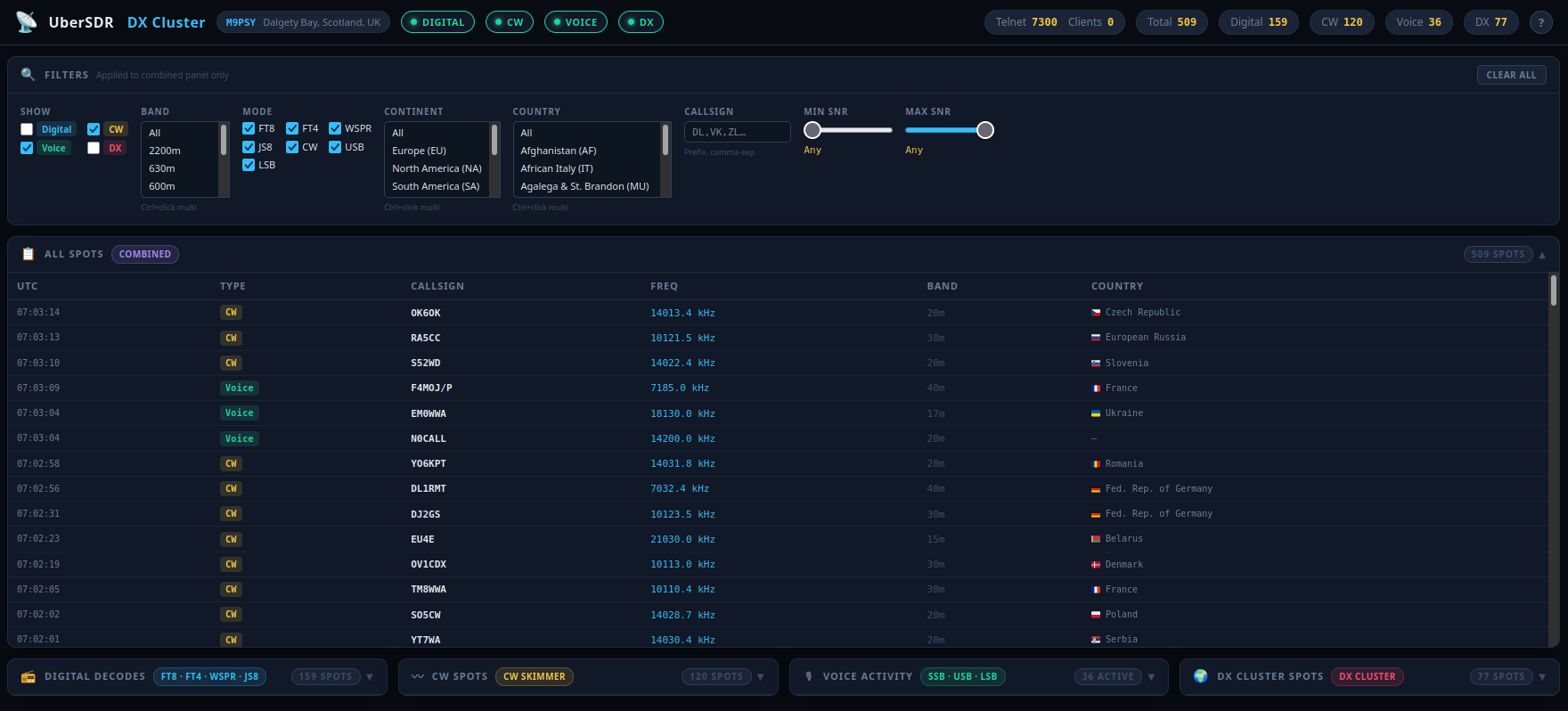
DX Cluster — Web Interface
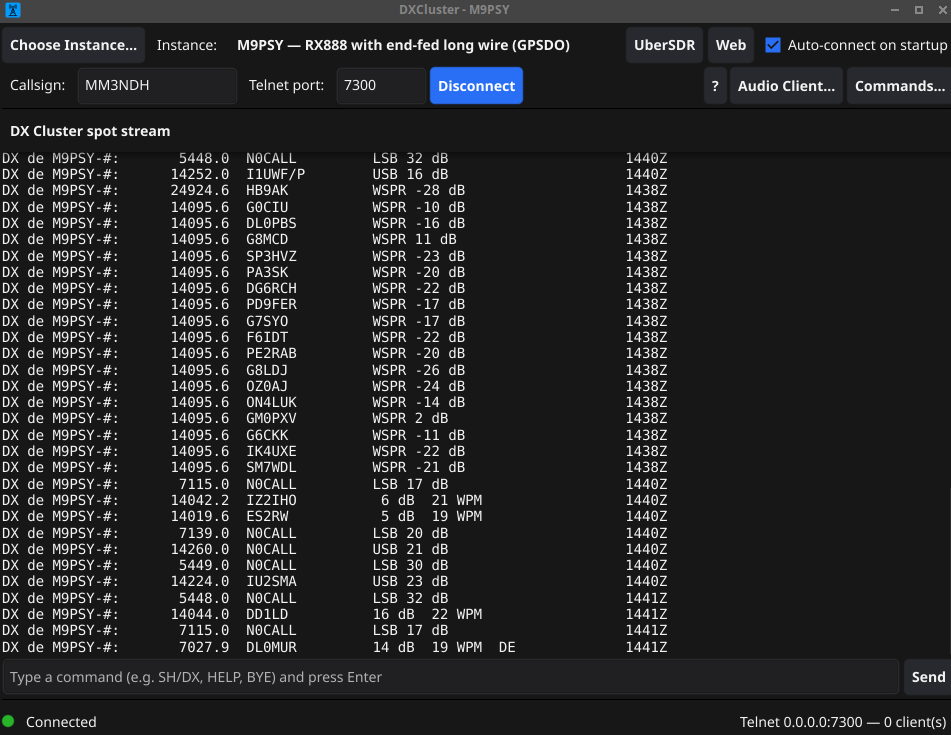
DX Cluster — Desktop Client
NTP — Radio-Disciplined Time Server
A stratum-1 NTP server disciplined by WWV, WWVH, WWVB, MSF, DCF77 or Allouis time signals heard over one or more UberSDR receivers — with upstream NTP failover, a live status page, NMEA output and Home Assistant integration.
Time From the Airwaves
Decodes the broadcast time code in process from WWV/WWVH (2.5–25 MHz), WWVB or MSF (60 kHz), DCF77 (77.5 kHz) and Allouis (162 kHz), tuning each on its carrier as IQ. Serves the result as NTP on port 123 as a genuine stratum-1 radio clock.
Several Receivers & Frequencies
HF propagation makes any single band unreliable — 10 MHz is excellent in the afternoon and gone at 3am. Multiple frequencies and receivers are combined, with a consensus veto that rejects any source disagreeing with the rest.
Upstream NTP Failover
Ordinary NTP servers act as a second, independent class of source. If the band dies overnight it fails over without oscillating, advertises its stratum honestly, and continuously reports the difference between radio and network time.
Zero-Configuration Install
Out of the box it listens to the local receiver on WWV 5, 10 and 15 MHz, and automatically adds DCF77 if your receiver is within range of Mainflingen. Measured accuracy is a few milliseconds when the delay model fits the path.
Live Status Page & API
A status page ticks with the broadcast itself and shows every source's acquisition stage, SNR, offset and history charts. A read-only JSON API, per-second SSE stream and event log are available for other tools.
MQTT, NMEA & 1PPS
Publishes to MQTT and Home Assistant through UberSDR with nothing to configure. NMEA 0183 over TCP lets gpsd, chrony or ntpd use it as a reference clock, and an optional 1PPS serial output can discipline other hardware.
NTP Screenshots
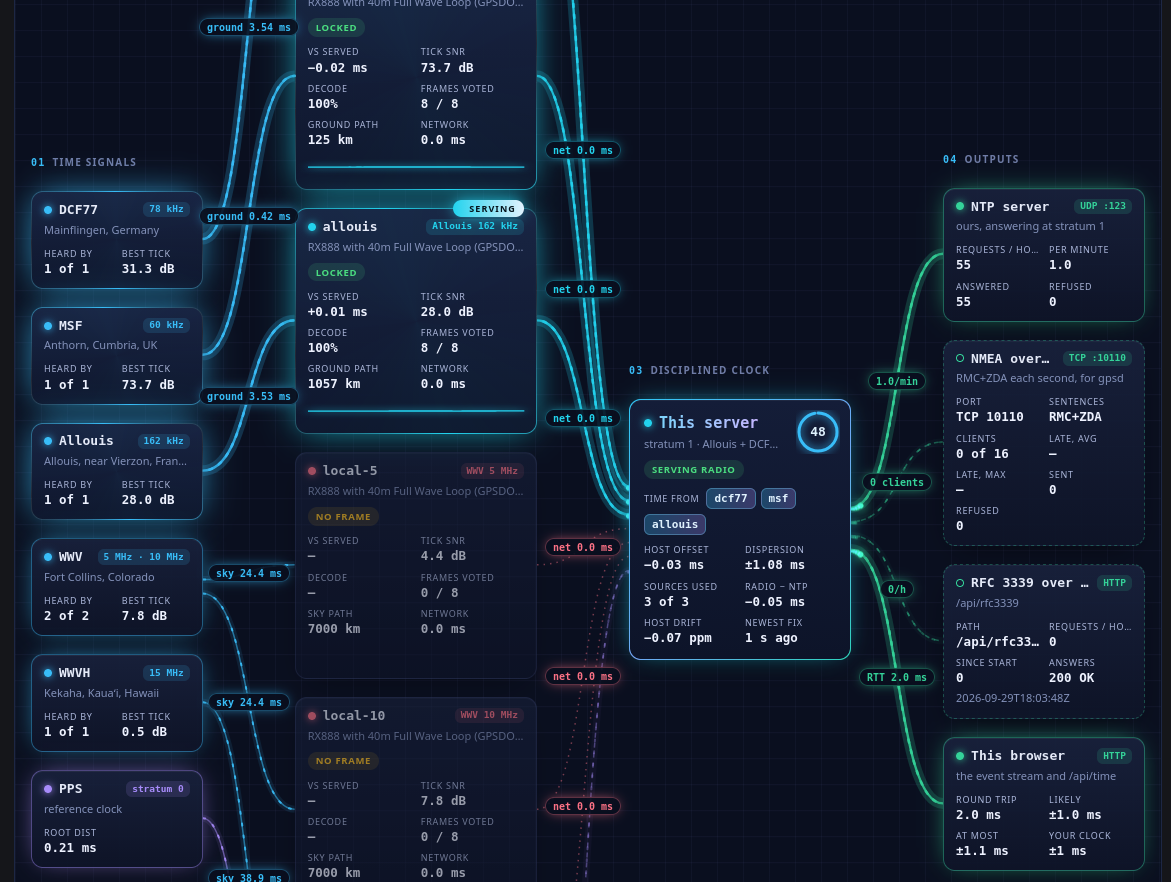
Status Page — Time Signals, Receivers, Disciplined Clock & Outputs
NDB — Non-Directional Beacon Decoder
Find every non-directional beacon carrier in the LF/MF band and decode each beacon's Morse ident in parallel — matched against the OurAirports navaid database and plotted on a map, with reception statistics for propagation.
Every Beacon, One Session
A single wideband IQ stream covers roughly 270–442 kHz by default — every beacon in it is detected and decoded simultaneously for the cost of one UberSDR session. Additional streams can be added to cover other regions.
Three Morse Decoders
An NDB-specific keying decoder learns each beacon's tone, threshold and speed; a fold decoder averages a minute of repeats to copy beacons too weak to read one ident at a time; and ggmorse provides a second opinion where it helps.
Navaid Matching & Map
Decoded idents are matched against the OurAirports navaid database and located relative to your receiver, with distance and bearing. A map shows heard beacons alongside published beacons you haven't heard yet.
Automatic Revisits
Once identified, a beacon frees its decoder and its carrier is tracked for free. It is revisited every 15 minutes to reconfirm its ident, so decoder slots go to new carriers and every beacon gets a turn.
Propagation Statistics
Reception history is kept for 30 days: beacons heard per hour, furthest heard, availability by distance band and hour of day — showing skywave opening up at night. Every section downloads as CSV.
Live Web Interface & API
Watch the spectrum, a live beacon table, the Morse copy as it is decoded, and a persistent heard log in your browser. A JSON API exposes beacons, stats, spectrum and navaid search for other tools.
NDB Screenshots
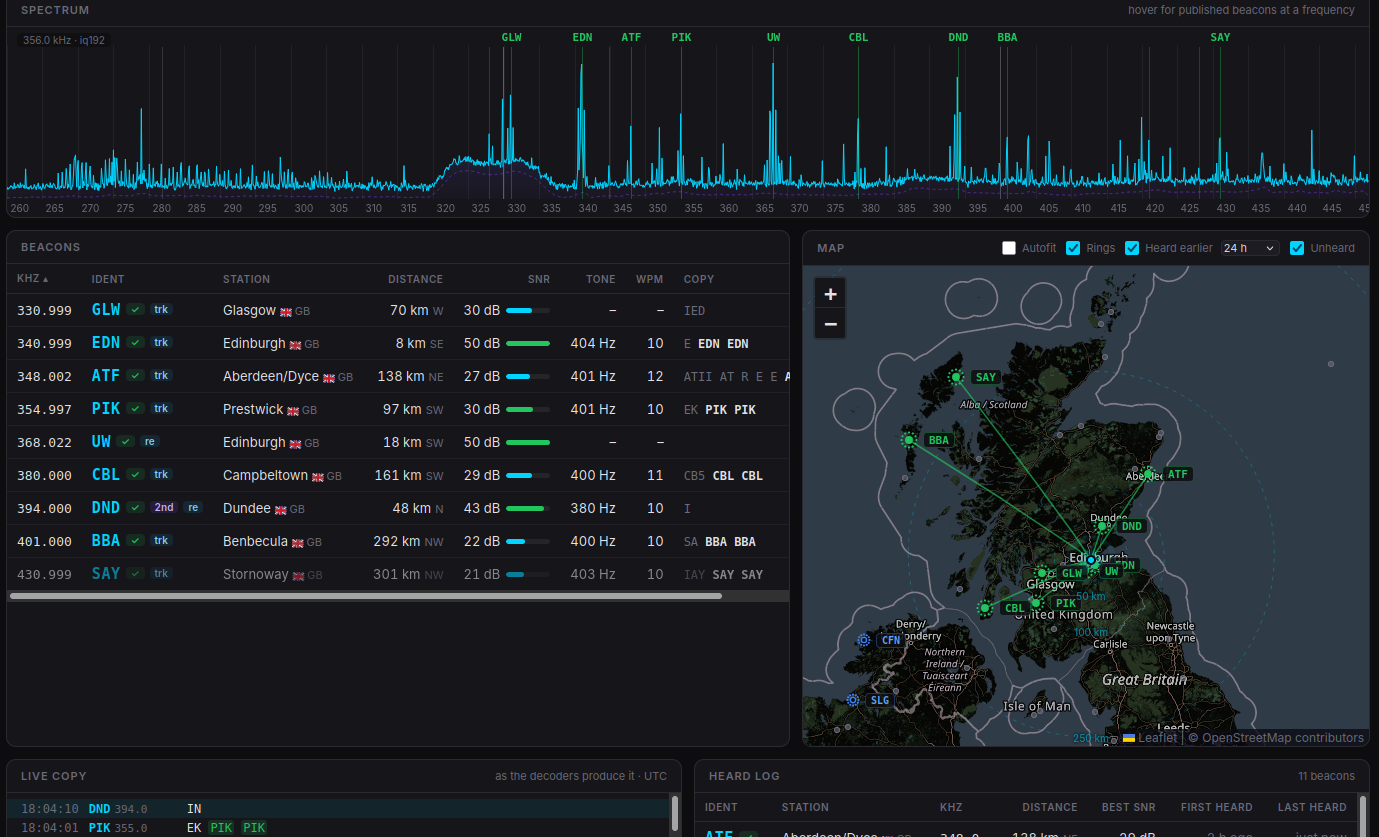
Live Spectrum, Beacon Table, Map & Morse Copy
Device Firmware
Open-source firmware projects for hardware devices that integrate with UberSDR. Flash directly from your browser or build from source.
Galactic Unicorn
Pimoroni Galactic Unicorn LED Matrix Display
MicroPython firmware for the Pimoroni Galactic Unicorn (53×11 RGB LEDs, Raspberry Pi Pico W). Displays UberSDR notification events — CW spots, digital decodes, chat messages, band conditions and more — with scrolling text, colour effects, alert sounds via the built-in speaker, and automatic brightness control via the ambient light sensor.
- Receives UberSDR notification events over WiFi
- Priority queue with configurable colours, effects & scroll speed
- Alert sounds — named patterns including DX, spot, alarm and more
- Auto-brightness via ambient light sensor
- Supports Galactic, Stellar and Cosmic Unicorn models
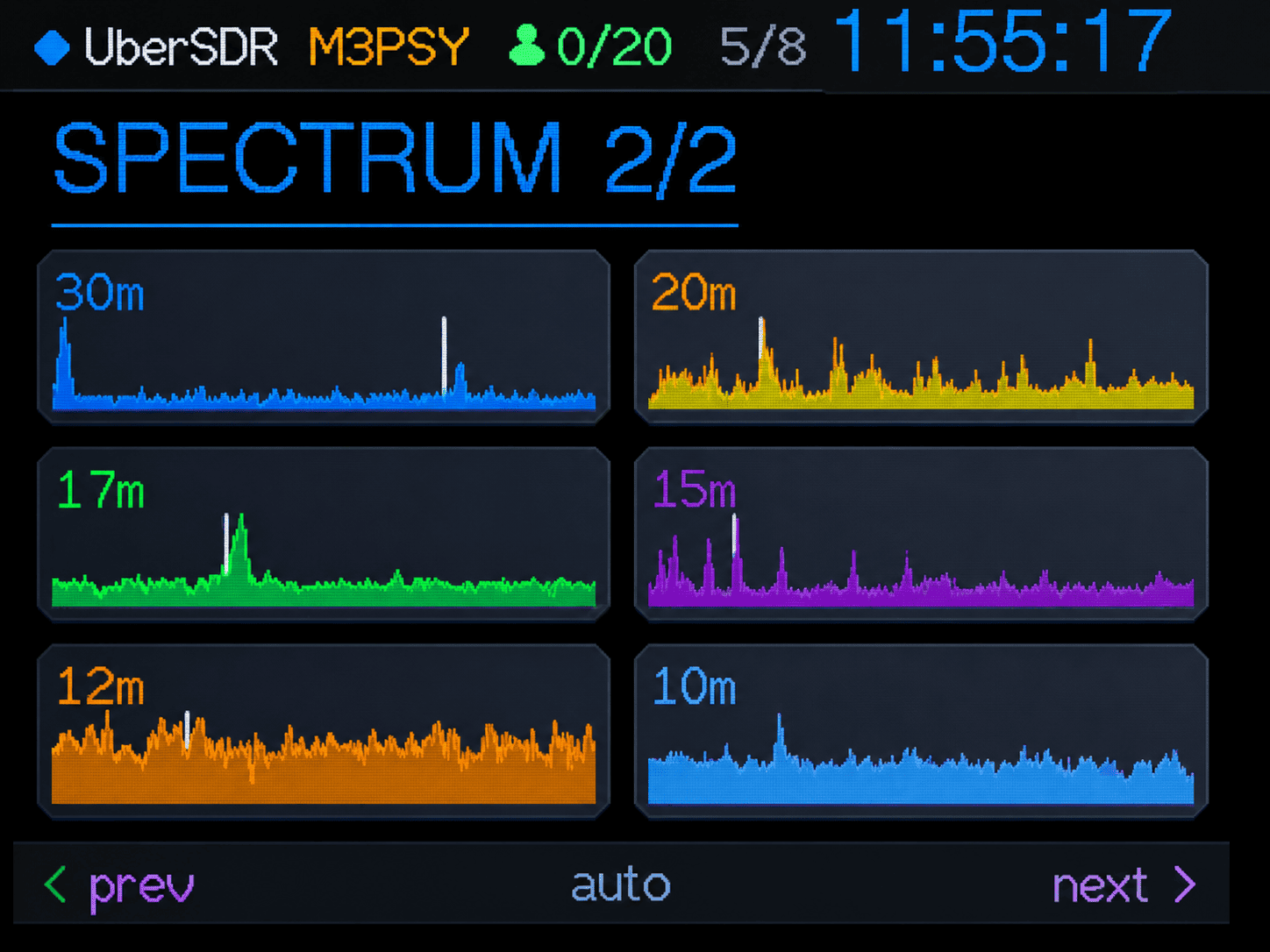
Cheap Yellow Display
ESP32-2432S028R (CYD) — 320×240 Touchscreen
ESP32 firmware for the "Cheap Yellow Display" — a compact 320×240 colour touchscreen that acts as a live dashboard for your UberSDR instance. Cycles through metric slides showing users, system load, band conditions, spectrum charts, space weather, antenna state and rankings. Also receives webhook notifications as toast overlays.
- Live slideshow — users, load, band conditions, spectrum, space weather, weather, antenna & rankings
- Webhook toast notifications from UberSDR
- On-screen touch keyboard for WiFi setup — no phone needed
- NVS-backed settings survive reboots; factory reset via BOOT button
MS-S5 Antenna Switch
ANTENI.NET MS-S5 / ANTENNAS webSWITCH (ESP8266)
Replacement firmware for the MS-S5 WiFi 5-port antenna switch. Adds a modern dark web UI (PWA), REST JSON API, MQTT support, time-based scheduler, lock mode, OLED display and OTA updates.
- Modern dark PWA web UI — antenna grid, schedule, settings, log & help
- REST JSON API for scripting and SDR automation
- MQTT support — Home Assistant friendly
- Time-based scheduler — switch antennas automatically by day/time
- OLED display showing current antenna, IP, clock and lock state
- OTA firmware updates via the web UI
Build Your Own UberSDR Instance
Set up your own UberSDR instance with affordable hardware and our Docker-based software. Join the network and share your local radio spectrum with the community.
What You Need

SDR Hardware
RX-888 MkII
High-performance SDR receiver available from AliExpress. Offers excellent dynamic range and wide frequency coverage.
Please note the RX-888 MkII is the only currently supported hardware. UberSDR runs the 888 at 64 MSPS and does not require any additional cooling.
For improved frequency stability, it is recommended to discipline the oscillator using a 27 MHz GPSDO connected to the RX-888 MkII's external clock input.
UberSDR supports network antenna switches and recommends the MS-S5.
Antenna
Receive Antenna
An active loop or random long wire make great receive antenna choices for HF reception.
Optionally add a low and/or high pass filter.
- ~1.8 MHz high pass filter
- ~40 MHz low pass filter
- Notch filters for AM broadcast
Filters are only really necessary if you live near a high power radio transmitter.
If you also operate a transmitter and want to share the same antenna, SDR TX/RX switches are readily available and inexpensive. These automatically disconnect the receiver during transmit, protecting the SDR's front end from excess RF and preventing damage.
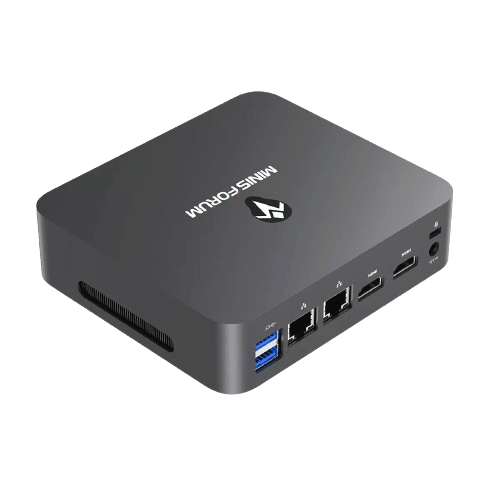
Computer
Computer Options:
- Low: N100/N150 based MiniPC or Raspberry Pi 5 / Radxa ROCK 5 (new)
- Medium: HP EliteDesk 800 G2 i7-6700 MiniPC (eBay)
- High: Intel 13th Gen i7 or Ryzen equivalent MiniPC
Medium spec is sufficient for most stations wanting all band FT8 skimming and several web users. AVX2 is a requirement which is any Intel CPU from Haswell (2013) onwards.
Be realistic about what your CPU can achieve — simultaneous decoding and supporting many web users is demanding. Choose your spec accordingly.
Software
Docker-Based Deployment
UberSDR runs in Docker containers for easy installation and management. Simply pull the image and configure your setup.
Both Ubuntu 24.04 and Debian 13 (Trixie) have been tested and known to work with the installation script.
UberSDR is extensible via Add-ons — each runs in its own container and acts as a client, making them ideal for background tasks like decoding, recording, and monitoring.

You must generate the FFTW Wisdom file (via Admin → Radiod tab) and in the radiod config on the same page set fft-threads to 2. The Wisdom generation on a Pi 5 can take between 6–8 hours so be patient! Until the Wisdom generation is complete don't expect the system to be useable, so grab a beer or coffee. Once generated and fft-threads set to 2 save the config and restart UberSDR.
Why Build Your Own?
Contribute to the global SDR network
Full control over your SDR setup
Affordable hardware options
Low power consumption
Installation Instructions
Grab Your Mini PC
Will need a monitor/keyboard and USB memory stick to install Ubuntu.

Install Ubuntu Server 24.04
Create a bootable Ubuntu USB memory stick and install Ubuntu Server 24.04. Ensure to choose Ubuntu Server as we do not want a GUI. Make sure you select to install OpenSSH Server when asked.
Plug in RX-888 MkII
Using the provided USB 3 cable plug the SDR into the computer. Probably a good idea to attach the antenna at this point. Ensure it is plugged into the SMA socket marked 'H'.
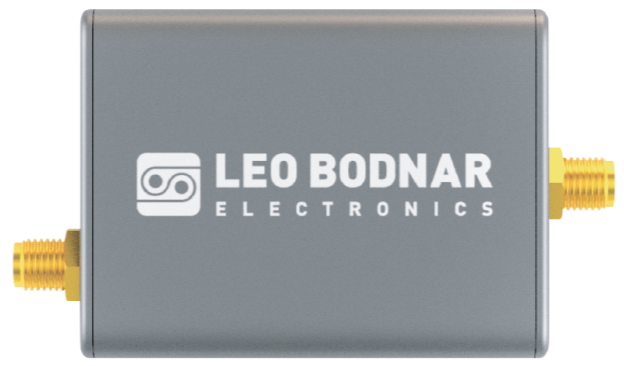
(Optional) Plug in Leo Bodnar LBE-1420
If your RX888 has the Clock Kit installed and you have an LBE-1420, plug it into a USB port and ensure the GPS Antenna and Clock Out are connected. Ensure the GPS antenna has a clear view of the sky and ideally is outside. The later Setup step allows you to configure it.
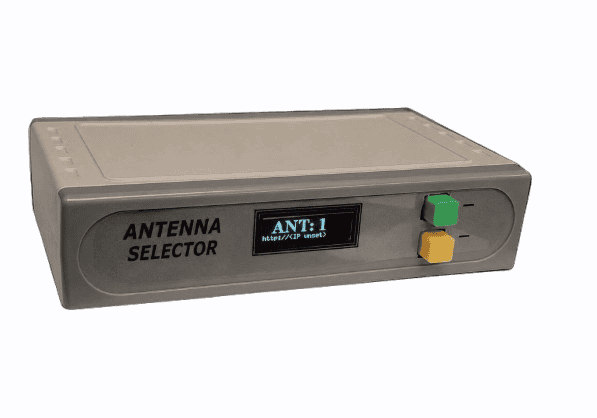
(Optional) Connect MS-S5 Antenna Switch
If you have an MS-S5 WiFi antenna switch, connect it to your network and ensure it is powered on. We suggest running the UberANT firmware. The later Setup step allows you to configure UberSDR to control it.
Install UberSDR
SSH into your newly installed UberSDR computer and run the following:
curl -fsSL https://ubersdr.org/install.sh | bashConfigure UberSDR
Open a web browser on your desktop/laptop: http://ubersdr.local:8080/admin.html and log in with the admin password shown at the end of the installation script output.
Generate Wisdom
The setup wizard will guide you through this step automatically. This pre-computes optimal FFT execution plans, reducing ongoing CPU usage. It can take a few minutes to a few hours depending on your CPU. ⚠️ Essential on ARM64 SBCs and slower x86 CPUs. ARM64 SBCs also need fft-threads set to 2 as a single Cortex core will struggle.
Download Desktop Client
Download the desktop client for your operating system. You can also access the web interface directly.
Enable Public Access (optional but encouraged!)
If you have bandwidth to spare and want to make your instance publicly accessible, use the public access wizard. Automatic TLS and DNS are available:
- Zero Config Tunnel (ubersdr.org) - easiest / recommended
- Port forward (ubersdr.org or own domain) - lower latency
- Cloudflare (own domain)
One web user requires between 100-200 kbps (bits not bytes!). The Zero Config Tunnel has been successfully tested with Starlink.
Join the Community
Join the UberSDR discussion board on groups.io to get help, share your setup, and stay up to date with the latest news and announcements.
💬 groups.io
Admin Control Center
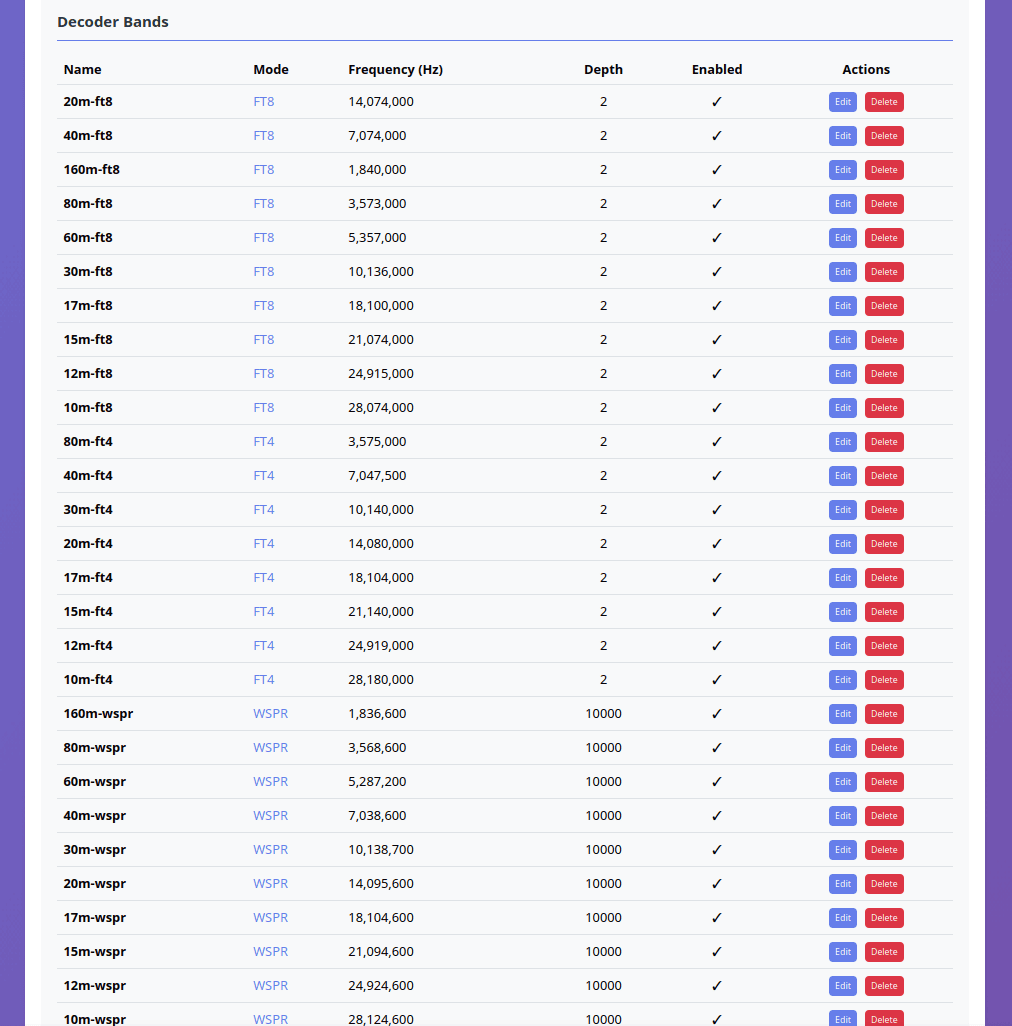
Decoder Management
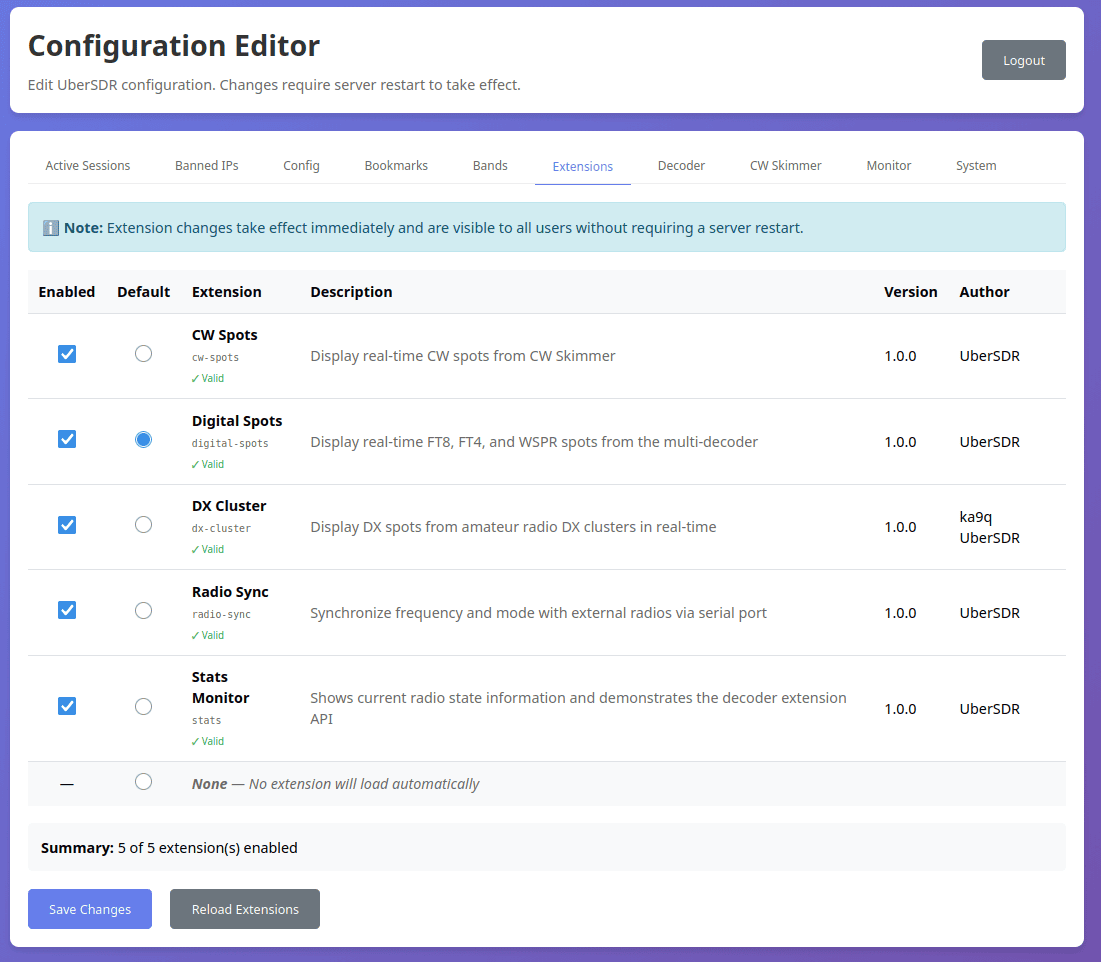
Extensions Configuration
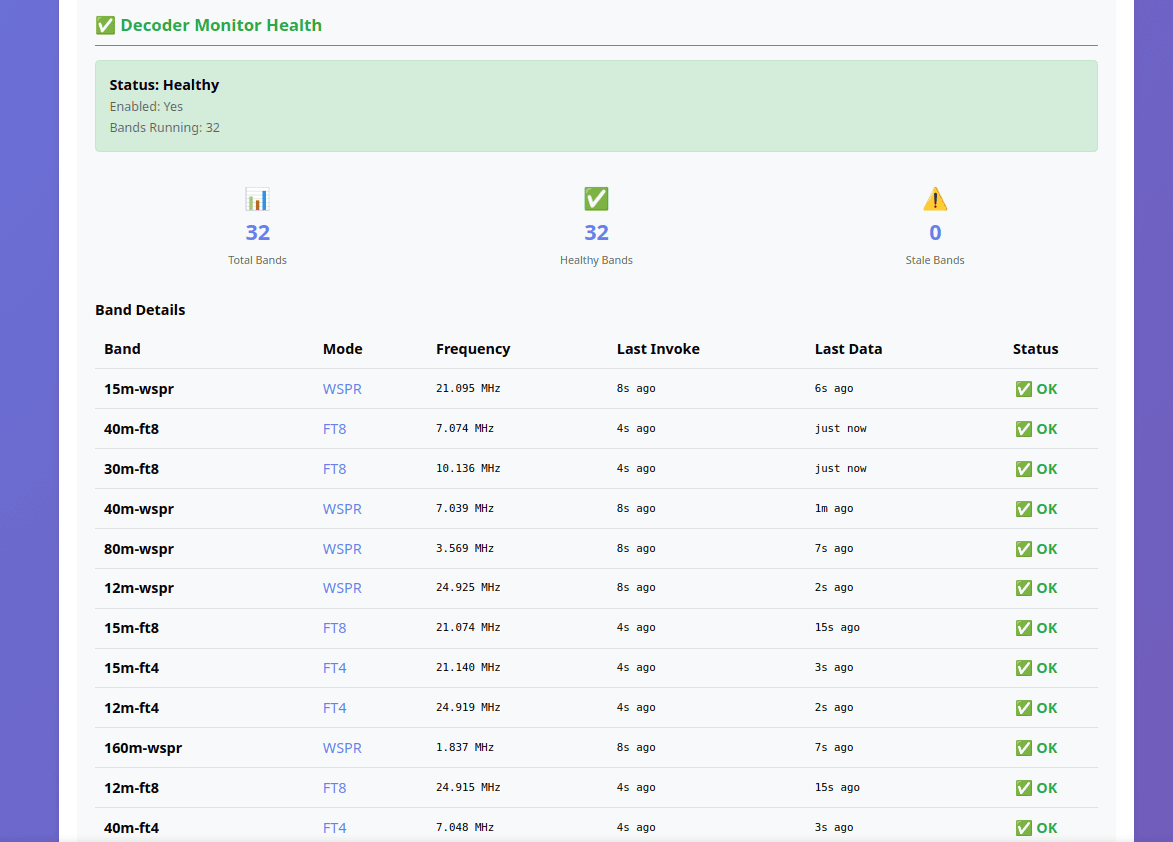
System Health Monitoring

Active Sessions
Getting Started
Choose an Instance
Browse the available instances map and select one near you or in a location of interest.
Connect
Click on an instance to access its web interface and start exploring the radio spectrum.
Tune & Listen
Select your frequency, adjust settings, and enjoy real-time SDR reception.